Skip navigation.
Home

Languages

RSS Feed FromDual on Linked In Recommend us on Xing Join us on Facebook Google+ Flickr Contact us

Recovery

Recover lost .frm files for InnoDB tables

Recently I found in a forum the following request for help:

To zip, or not to zip, that is the question

Abstract: In this article we have a look at the compression options of common zipping tools and its impact on the size of the compressed files and the compression time. Further we look at the new parallel zip tools which make use of several cores.

MySQL Restore and Recovery methods

Backup is for sissies! Let's have a look what we can do when we are not a sissy...

First of all: Your life is much easier when you have a proper backup process implemented and verified the restore procedure of your MySQL database.

But what if you have no backup in place and did a DROP TABLE. What shall we do?

We assume our data we just dropped are located on the following device:

# export IMAGE=/dev/hda1

First of all, power off your server. This avoids that the operating system writes data down to disk and overwrites your table you just dropped.

Which table is hit by an InnoDB page corruption?

InnoDB is known to have crash-recovery capabilities and thus is called a crash safe storage engine (in contrary to MyISAM). Never the less under certain circumstances it seems like InnoDB pages can get corrupt during a crash and then a manual crash-recovery is needed.

MySQL Cluster restore

Recently the question came up if it is faster to restore a MySQL cluster when all nodes are up or only ONE node from each node group during restore.

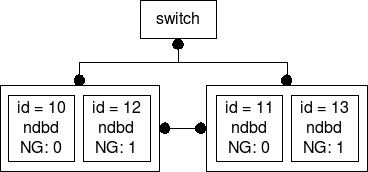
The answer from our gurus was: All nodes up during restore! I wanted to find out why. So I set up the following cluster and started to measure:

MySQL Cluster set up

Cluster set-up

MySQL Cluster backup

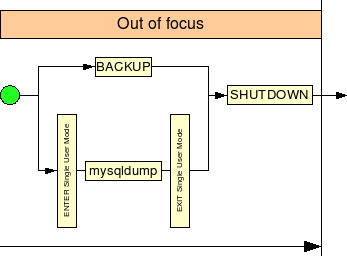
The backup is not that interesting. But I made the drawing for possible future use :-) :

Syndicate content