


Feed Aggregator
Non-standard database set up with SELinux
What is SELinux?
The Security-Enhanced Linux is an extension to the Linux Kernel, made by the NSA (National Security Agency). It implements Mandatory Access Controls (MAC), which allow an administrator to define, how applications and users can access resources on a system.
There is more detail in the SELinux Wki: https://selinuxproject.org/page/FAQ
… and the CentOS documentation: https://wiki.centos.org/HowTos/SELinux
Some distributions have it installed by default, but not active, some have it installed and active and some don’t have it installed.
How do I know if SELinux is active?
SELinux comes with some new commands. To see the current status of SELinux, use “getenforce” or “sestatus”:
[root@localhost ~]# getenforce
Enforcing
- OR -
[root@localhost ~]# sestatus
SELinux status:                enabled
SELinuxfs mount:               /sys/fs/selinux
SELinux root directory:        /etc/selinux
Loaded policy name:            targeted
Current mode:                  enforcing …
Taxonomy upgrade extras: mysql, mariadb, centos, security, selinux,
Categories:
FromDual All (En)
FromDual TechFeed (En)
MySQL and MariaDB variables inflation
MySQL is well known and widely spread because of its philosophy of Keep it Simple (KISS).
We recently had the discussion that with newer releases also MySQL and MariaDB relational databases becomes more and more complicated.
One indication for this trend is the number of MySQL server system variables and status variables.
In the following tables and graphs we compare the different releases since MySQL version 4.0:
mysql> SHOW GLOBAL VARIABLES;
mysql> SHOW GLOBAL VARIABLES LIKE 'innodb%';
mysql> SHOW GLOBAL STATUS;
mysql> SHOW GLOBAL STATUS LIKE 'innodb%';
| Version | System | IB Sys. | Status | IB Stat. |
|---|---|---|---|---|
| MySQL 4.0.30 | 143 | 22 | *133 | **0 |
| MySQL 4.1.25 | 189 | 26 | *164 | **0 |
| MySQL 5.0.96 | 239 | 36 | 252 | 42 |
| MySQL 5.1.73 | 277 | 36 | 291 | 42 |
| MySQL 5.5.51 | 317 | 60 | 312 | 47 |
| MySQL 5.6.31 | 438 | 120 | 341 | 51 |
| MySQL 5.7.15 | 491 | 131 | 353 | 51 |
| MySQL 8.0.0 | 488 | 124 | 363 | 51 |
* Use SHOW STATUS instead.
Use SHOW ENGINE INNODB STATUS<br>G instead.
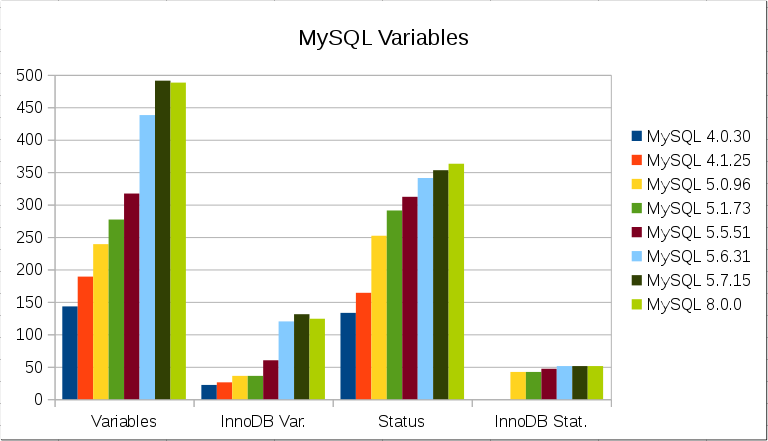
| Version | System | IB Sys. | Status | IB Stat. |
|---|---|---|---|---|
| MariaDB 5.1.44 | 354 | 72 | 301 | 44 |
| MariaDB … |
Taxonomy upgrade extras: mysql, variables, status, mariadb,
New Features in MySQL and MariaDB
As you probably know MySQL is an Open Source product licensed under the GPL v2. The GPL grants you the right to not just read and understand the code of the product but also to use, modify AND redistribute the code as long as you follow the GPL rules.
This redistribution has happened in the past various times. But in the western hemisphere only 3 of these branches/forks of MySQL are of relevance for the majority of the MySQL users: Galera Cluster for MySQL, MariaDB (Server and Galera Cluster) and Percona Server (and XtraDB Cluster).
Now it happened what has to happen in nature: The different branches/forks start to diverge (following the marketing rule: differentiate yourself from your competitors). The biggest an most important divergence happens now between MySQL and MariaDB.
Recently a customer of FromDual claimed that there is no more progress in the MySQL Server development whereas the MariaDB Server does significant progress. I was wondering a bit how this statement could have been made. So I try to …
Taxonomy upgrade extras: features, mariadb, mysql, gtid, comparison,
FromDual Performance Monitor for MySQL and MariaDB 1.0.0 has been released
FromDual has the pleasure to announce the release of the new version 1.0.0 of its popular Database Performance Monitor for MySQL, MariaDB, Galera Cluster and Percona Server fpmmm.
You can download fpmmm from here.
In the inconceivable case that you find a bug in fpmmm please report it to our Bug-tracker.
Any feedback, statements and testimonials are welcome as well! Please send them to feedback@fromdual.com.
This release contains various bug fixes and improvements. Further significant functionality has changed and improved. So please read carefully…
Changes in fpmmm v1.0.0
fpmmm agent
- SysV init script added to run
fpmmmas daemon. - SystemD unit file added to run
fpmmmas daemon. - Default location of
fpmmm.conffile made unique to/etc/. - Requirement checks improved and made more restrictive.
- Error Messages improved and made more understandable.
- Library
MyEnv.incsynced from MyEnv project. zabbix_agentd.initandzabbix_server.initmoved frombintotplfolder.fpmmm_server.initrenamed tofpmmm_sysv.init. …
Taxonomy upgrade extras: performance, monitor, monitoring, fpmmm, maas, performance monitor, release,
Categories:
FromDual All (En)
FromDual InfoFeed (En)
FromDual Backup and Recovery Manager for MySQL 1.2.3 has been released
FromDual has the pleasure to announce the release of the new version 1.2.3 of the popular Backup and Recovery Manager for MySQL and MariaDB (fromdual_brman).
You can download the FromDual Backup and Recovery Manager from here.
In the inconceivable case that you find a bug in the Backup and Recovery Manager please report it to our Bugtracker or just send us an [email](mailto:contact@fromdual.com?Subject=Bug report for fromdual_brman).
Any feedback, statements and testimonials are welcome as well! Please send them to feedback@fromdual.com.
Upgrade from 1.2.x to 1.2.3
# cd ${HOME}/product
# tar xf /download/fromdual_brman-1.2.3.tar.gz
# rm -f fromdual_brman
# ln -s fromdual_brman-1.2.3 fromdual_brman
Changes in FromDual Backup Manager 1.2.3
This release contains mainly fixes related to MySQL 5.7 and various minor fixes.
You can verify your current FromDual Backup Manager version with the following command:
shell> fromdual_bman --version
FromDual Backup Manager
- New tests added to test-suite.
- MyEnv library …
Taxonomy upgrade extras: backup, restore, recovery, pitr, fromdual_brman, brman, release, bman, rman,
Multi-Instance set-up with MySQL Enterprise Server 5.7 on RHEL 7 with SystemD
In our current project the customer wants to install and run multiple MySQL Enterprise Server 5.7 Instances on the same machine (yes, I know about virtualization (we run on kvm), containers, Docker, etc.). He wants to use Redhat Enterprise Linux (RHEL) 7 which brings the additional challenge of SystemD. So mysqld_multi is NOT an option any more.
We studied the MySQL documentation about the topic: Configuring Multiple MySQL Instances Using systemd. But to be honest: It was not really clear to me how to do the job…
So we started to work out our own cook-book which I want to share here.
The requirements are as follows:
- Only ONE version of MySQL Enterprise Server binaries at a time is available. If you want to have more complicated set-ups (multi version) consider our MyEnv.
- Because Segregation of Duties is an issue for this customer from the financial industries we are not allowed to use the operating system
rootuser or havesudoprivileges. - We have to work with the operating system user
mysqlas non …
Taxonomy upgrade extras: multi instance, mysqld_multi, mysql enterprise server, rhel, red hat, myenv, systemd. container,
Enterprise Server vs Community Server packages
I found out that we were wrong in this. We have taken RHEL6 MySQL RPM packages instead of RHEL7 packages. This is the reason why the installation was not smooth (but it worked) and why still old sysV init scripts were used.
Taxonomy upgrade extras:
Categories:
EditLine vs ReadLine
I was informed that nowadays MySQL Enterprise Server and MySQL Community Server use both EditLine (since MySQL 5.6?).
Taxonomy upgrade extras:
Categories:
What are the differences between MySQL Community and MySQL Enterprise Server 5.7
The MySQL Server itself
The differences between the MySQL Community Server and the MySQL Enterprise Server 5.7 are as follows as claimed by Oracle:
- The license of the MySQL Server itself.
- Only MySQL Enterprise Edition has the Enterprise plugins (Thread Pool, PAM, Audit, etc.)
- Certifications and Indemnification support for the MySQL Enterprise Server.
- The MySQL Community Server statically links against yaSSL
and readlinevs MySQL Enterprise Server against OpenSSLand libedit. This restriction seems to be lifted in MySQL 8.0.
The license of the MySQL Server
The MySQL Community Server is licensed under the GNU General Public License version 2 whereas the MySQL Enterprise Server is under an Oracle proprietary license as you can see from the following diffs of 2 random files:
shell> diff mysql-5.7.16-linux-glibc2.5-x86_64/share/charsets/latin1.xml mysql-advanced-5.7.16-linux-glibc2.5-x86_64/share/charsets/latin1.xml
6,7c6,7
<  Copyright (c) 2003, 2005 MySQL AB
<    Use is subject to license terms
--- …
Taxonomy upgrade extras: mysql server, mysql community server, mysql enterprise server, enterprise, license, sidegrade,
MySQL 5.7.16 behaves diefferntly thant MySQL 5.7.15
With 5.7.15 we had some strange installation errors which disappeared with 5.7.16. Further we found, that 5.7.15 still uses SysV init scripts and 5.7.16 has switched to SystemD…
Taxonomy upgrade extras:
Categories:
How to build your own RPM repository for MySQL Enterprise Server 5.7 on RHEL 7
Prepare the RPM repository server
Install the software to create a RPM repository server (on an Ubuntu web server):
shell> sudo apt-get install createrepo
Create the directory structures and initialize the repositories:
shell> sudo mkdir -p /var/www/html/repos/centos/7/os/x86_64
shell> sudo createrepo /var/www/html/repos/centos/7/os/x86_64/
Copy the MySQL Enterprise RPM packages to the repository:
shell> sudo cd /var/www/html/repos/centos/7/os/x86_64/
shell> sudo unzip -v /download/V790254-01.zip   # MySQL Enterprise Server 5.7.16
Archive:  /download/V790254-01.zip
   Length  Method      Size Cmpr    Date    Time   CRC-32   Name
---------  ------  -------- ---- ---------- ----- --------  ----
 23979568  Stored  23979568   0% 2016-09-29 16:56 ae6693b1  mysql-commercial-client-5.7.16-1.1.el7.x86_64.rpm
 45327096  Stored  45327096   0% 2016-09-29 16:56 bb83c965  mysql-commercial-embedded-5.7.16-1.1.el7.x86_64.rpm
   271300  Stored    271300   0% 2016-09-29 16:56 b4eebc96 …
Taxonomy upgrade extras: rpm, repository, mysql, mysql enterprise server, enterprise, rhel, red hat,
How to Install MySQL Enterprise Server 5.7 on Red Hat Enterprise Linux 7
If you have already Red Hat Enterprise Linux 7 (RHEL 7) or CentOS 7 in use you probably found out, that it is not that easy to install MySQL Enterprise Server because there are already pre-installed MariaDB 5.5 libraries:
shell> yum localinstall mysql-commercial-client-5.7.16-1.1.el7.x86_64.rpm mysql-commercial-libs-5.7.16-1.1.el7.x86_64.rpm mysql-commercial-server-5.7.16-1.1.el7.x86_64.rpm mysql-commercial-common-5.7.16-1.1.el7.x86_64.rpm
Loaded plugins: fastestmirror
Examining mysql-commercial-client-5.7.16-1.1.el7.x86_64.rpm: mysql-commercial-client-5.7.16-1.1.el7.x86_64
Marking mysql-commercial-client-5.7.16-1.1.el7.x86_64.rpm to be installed
Examining mysql-commercial-libs-5.7.16-1.1.el7.x86_64.rpm: mysql-commercial-libs-5.7.16-1.1.el7.x86_64
Marking mysql-commercial-libs-5.7.16-1.1.el7.x86_64.rpm to be installed
Examining mysql-commercial-server-5.7.16-1.1.el7.x86_64.rpm: mysql-commercial-server-5.7.16-1.1.el7.x86_64
Marking mysql-commercial-server-5.7.16-1.1.el7.x86_64.rpm to be installed
Examining …
Taxonomy upgrade extras: installation, mysql, enterprise, rhel, red hat, centos, mariadb, server,
The same for the MySQL 5.7 Community Server
The same should apply for the MySQL 5.7 Community Server…
Taxonomy upgrade extras:
Categories:
How to move InnoDB-Logfiles on a Galera Cluster
Somebody recently asked, what they had to do, if they wanted to move their InnoDB-Logfiles back to the datadir. As a challenge, the servers were part of a Galera Cluster.
My first thought was:
The problem is not the Galera Cluster itself, it is the rsync-SST (wsrep_sst_method = rsync) that could cause trouble and destroy your InnoDB-Logfiles, by simply overwriting or deleting them.
So I tried to confirm my thought and realised, I was wrong. This works anyway, because the node just takes the dataset from the other node. (The backup plan was ready now.)
Preferably, the cluster does an IST, where it only fetches the missing write sets. This way you do not have the danger of losing the InnoDB-Logfiles.
I will explain the way I would recommend:
First edit the my.cnf. The variable you have to change is innodb_log_group_home_dir. This variable contains the location of the log files. Set it to the new location of the logfiles.
After this is done, stop the MySQL server:
shell> service mysql stop

- OR, for those …
Taxonomy upgrade extras: galera cluster, innodb,
Categories:
FromDual All (En)
FromDual TechFeed (En)
Show overmounted files
Another idea we discussed (but does not fit to the problem) is lost space due to over-mounted directories. If you have some files in this directory they are not shown any more (= hidden) because they are over-mounted but they are still there an used space.
To look into an over-mounted directory to see the files in there the following recipe might help:
cd /mnt
touch 1 2 3
cd
mount /dev/sdd1 /mnt -> files are hidden now

mount --bind / /mnt2
ls /mnt2/mnt
1  2  3
Taxonomy upgrade extras:
Categories:
Deleted files still (growing) on disk
For this phenomenon, the relevant documentation is here: deleting files. Close to the top, see this sentence:
The unlink function deletes the file name filename.
If this is a file’s sole name, the file itself is also deleted.
(Actually, if any process has the file open when this happens,
deletion is postponed until all processes have closed the file.)
This is the standard programming technique to ensure that temporary files are automatically cleaned up on a program or machine crash. Often this subject comes up as the difference in the output of "du" (follows directory entries) and "df" (checks file system space information).
Jörg Brühe
Taxonomy upgrade extras:
Categories:
Beware of large MySQL max_sort_length parameter
Today we had a very interesting phenomena at a customer. He complained that MySQL always get some errors of the following type:
[ERROR] mysqld: Sort aborted: Error writing file '/tmp/MYGbBrpA' (Errcode: 28 - No space left on device)
After a first investigation we found that df -h /tmp shows from time to time a full disk but we could not see any file with ls -la /tmp/MY*.
After some more investigation we found even the query from the Slow Query Log which was producing the same problem. It looked similar to this query:
SELECT * FROM test ORDER BY field5, field4, field3, field2, field1;
Now we were capable to simulate the problem at will with the following table:
CREATE TABLE `test` (
  `id` int(10) unsigned NOT NULL AUTO_INCREMENT,
  `data` varchar(64) DEFAULT NULL,
  `ts` timestamp NOT NULL DEFAULT CURRENT_TIMESTAMP ON UPDATE CURRENT_TIMESTAMP,
  `field1` varchar(16) DEFAULT NULL,
  `field2` varchar(16) DEFAULT NULL,
  `field3` varchar(255) DEFAULT NULL,
  `field4` varchar(255) DEFAULT NULL,
  `field5` …
Taxonomy upgrade extras: sort, file, order by,
FromDual Performance Monitor for MySQL and MariaDB 0.10.6 has been released
FromDual has the pleasure to announce the release of the new version 0.10.6 of its popular Database Performance Monitor for MySQL, MariaDB, Galera Cluster and Percona Server fpmmm.
You can download fpmmm from here.
In the inconceivable case that you find a bug in fpmmm please report it to our Bug-tracker.
Any feedback, statements and testimonials are welcome as well! Please send them to feedback@fromdual.com.
This release contains various bug fixes and improvements. The previous release had some major bugs so we recommend to upgrade…
Changes in fpmmm v0.10.6
fpmmm agent
- Do not connect to server bug fixed.
- Special case when lock file was removed when it was read is fixed.
- Added
ORDER BYto allGROUP BYto be compliant for the future. - Zabbix 3.0 templates added.
- MaaS: Function
curl_file_createimplemented for php
< 5.5 - MaaS: Debug message fixed.
- Maas: Curl upload fixed.
- MaaS: InnoDB: Deadlock and Foreign Key errors are only escaped with xxx when used in MaaS. Otherwise they are sent normally. Foreign …
Taxonomy upgrade extras: mysql, performance, monitor, monitoring, fpmmm, maas, performance monitor, release,
MySQL Environment MyEnv 1.3.1 has been released
FromDual has the pleasure to announce the release of the new version 1.3.1 of its popular MySQL, Galera Cluster, MariaDB and Percona Server multi-instance environment MyEnv.
The new MyEnv can be downloaded here.
In the inconceivable case that you find a bug in the MyEnv please report it to our bug tracker.
Any feedback, statements and testimonials are welcome as well! Please send them to [feedback@fromdual.com](mailto:feedback@fromdual.com?Subject=Feedback for MyEnv).
Upgrade from 1.1.x or higher to 1.3.1
# cd ${HOME}/product
# tar xf /download/myenv-1.3.1.tar.gz
# rm -f myenv
# ln -s myenv-1.3.1 myenv
If you are using plug-ins for showMyEnvStatus create all the links in the new directory structure:
cd ${HOME}/product/myenv
ln -s ../../utl/oem_agent.php plg/showMyEnvStatus/
Changes in MyEnv 1.3.1
MyEnv
- Bash function
bootstrapadded. - Galera options
--bootstrap--new-clusterand start methodbootstrapwas implemented. Typo fixed. - New 5.7 variables added and 5.6 variables to avoid nasty warnings in the error …
Taxonomy upgrade extras: myenv, operation, mysql operations, multi instance, consolidation, testing, release, cloud, cgroups, container, mysqld_multi,
Multiple MySQL Instances on a Single Machine
Typically, on a single machine (be it a physical or a virtual one) only a single MySQL instance (process) is running. This is perfectly ok for all those situations where a single instance is sufficient, like for storing small amounts of data (RedHat using MySQL for postfix, KDE using it for akonadi, …), as well as those where a dedicated machine per MySQL instance is appropriate (high CPU load, memory fully loaded, availability requirements).
But there are also those users who want to (or would like to) have multiple instances which would still fit into a single machine. Even among them, a single instance per machine is typical. For this, there are good reasons:
- MySQL comes with defaults for files (config file, error log, …) and directories (data directory, binlogs, …) which would cause conflicts between multiple instances (unless they are changed).
- The scripts coming with MySQL, especially the automated start/stop with machine reboot/shutdown, are written for a single instance only. …
Taxonomy upgrade extras: myenv,
Categories:
FromDual All (En)
FromDual TechFeed (En)
Pages

