


Feed Aggregator
Hi, could you explain how
Hi, could you explain how InnoDB compression time is calculated ? Thx Cédric
Taxonomy upgrade extras:
Categories:
Does InnoDB data compression help with short disk space?
Because we are a bit short off disk space on one of our servers I had the idea to try out the MySQL feature Data Compression for InnoDB. This feature is useful if you have tables with VARCHAR, BLOB or TEXT attributes.
To not make it not too simple our table is partitioned as well. Our table looks like this:
CREATE TABLE `history_str` (
  `itemid` mediumint(8) unsigned NOT NULL DEFAULT '0',
  `clock` int(11) unsigned NOT NULL DEFAULT '0',
  `value` varchar(255) NOT NULL DEFAULT '',
  PRIMARY KEY (`itemid`,`clock`)
) ENGINE=InnoDB DEFAULT CHARSET=latin1
PARTITION BY RANGE (clock)
(PARTITION p2012_kw05 VALUES LESS THAN (1328482800) ENGINE = InnoDB,
 PARTITION p2012_kw06 VALUES LESS THAN (1329087600) ENGINE = InnoDB,
 PARTITION p2012_kw07 VALUES LESS THAN (1329692400) ENGINE = InnoDB,
 PARTITION p2012_kw08 VALUES LESS THAN (1330297200) ENGINE = InnoDB,
 PARTITION p2012_kw09 VALUES LESS THAN (1330902000) ENGINE = InnoDB,
 PARTITION p2012_kw10 VALUES LESS THAN (1331506800) ENGINE = InnoDB,
 PARTITION p2012_kw11 …
Taxonomy upgrade extras: innodb, compress,
Categories:
zabbix_sender failed
zabbix_sender was capable to connect and send (sent: 1) but processing the item failed (Processed 0, Failed 1)
This can happen because of the following reasons:
- The host name does not match
- The item does not exist
- There is a bug
The second problem imho is independent from the first one (except you hit a bug). Zabbix server could not reach Zabbix agent for some reasons. We also get this error from time to time.
So it could be that the bug you described causes this or some other reasons mentioned here:
https://support.zabbix.com/browse/ZBX-4232 http://www.zabbix.com/documentation/1.8/manual/about/what_s_new_1.8.9 http://www.zabbix.com/forum/showthread.php?t=24802
Increasing the timeout could help as well:
zabbix_server.conf
Timeout = 5
Taxonomy upgrade extras:
Categories:
Some more troubleshooting
Some more troubleshooting information: -bash-4.1$ zabbix_sender -z util-zabbix0 -s util-mysql0 -k FromDual.MySQLmysql.Questions -o “123456789” -vv
zabbix_sender [15878]: DEBUG: answer [{ “response”:“success”, “info”:“Processed 0 Failed 1 Total 1 Seconds spent 0.000056”}] Info from server: “Processed 0 Failed 1 Total 1 Seconds spent 0.000056” sent: 1; skipped: 0; total: 1
However, zabbix_server.log displays the following: 7684:20120312:214242.552 Zabbix agent item [FromDual.MySQL.check] on host [util-mysql0] failed: first network error, wait for 15 seconds
I also tested the network connectivity:
[root@util-zabbix0 zabbix]# telnet util-mysql0 3306 Trying ...… Connected to util-mysql0. Escape character is ‘^]’. J 5.5.204W0+$r3G!aH$xQmP*~_Bmysql_native_password exit !#08S01Got packets out of orderConnection closed by foreign host. [root@util-zabbix0 zabbix]# telnet util-mysql0 10050 Trying ...… Connected to …
Taxonomy upgrade extras:
Categories:
I apologize for the delayed
I apologize for the delayed response. I was able to get it running. However, recently, the following error has been appearing anytime I attempt to run the FromDualMySQLagent.pl scrip manually:
[zabbix@util-mysql0 ~]$ /usr/local/mysql_performance_monitor/FromDualMySQLagent.pl
sh: -c: line 17: syntax error near unexpected token ;;'
sh: -c: line 17: 7: len 8; hex 000000000000274b; asc ‘K;;’
I am running CentOS 6.2 x86_64 - perl packages listed below:
[zabbix@util-mysql0 ~]$ rpm -qa | grep perl perl-Compress-Raw-Zlib-2.023-119.el6_1.1.x86_64 perl-HTML-Tagset-3.20-4.el6.noarch perl-libwww-perl-5.833-2.el6.noarch perl-libs-5.10.1-119.el6_1.1.x86_64 perl-5.10.1-119.el6_1.1.x86_64 perl-ExtUtils-ParseXS-2.2003.0-119.el6_1.1.x86_64 perl-Time-HiRes-1.9721-119.el6_1.1.x86_64 perl-IO-Compress-Base-2.020-119.el6_1.1.x86_64 perl-Pod-Escapes-1.04-119.el6_1.1.x86_64 perl-version-0.77-119.el6_1.1.x86_64 perl-Pod-Simple-3.13-119.el6_1.1.x86_64 perl-Test-Harness-3.17-119.el6_1.1.x86_64 …
Taxonomy upgrade extras:
Categories:
Once in a while Zabbix graphs do not display any information
Hello
I have successfully installed and configured zabbix to work with your performance monitoring. However, every once in a while, the graphs in zabbix do not display any information. It seems when I invoke FromDualMySQLagent.pl things go back to normal. Do I need to setup a cron to refresh the data?
I have included the following line in /etc/zabbix/zabbix_agentd/userparameter_mysql.conf:
UserParameter=FromDual.MySQL.check,/usr/local/mysql_performance_monitor/FromDualMySQLagent.pl /usr/local/mysql_performance_monitor/etc/FromDualMySQLagent.conf
Any recommendations would be most welcome.
Taxonomy upgrade extras: mpm installation,
Categories:
Zabbix agent stopps working
Hello William,
A cron job should not be necessary. It looks like the Zabbix Server disables this specific Zabbix agent/host for some reasons. So we should find, why! Could you please have a look at the zabbix_server.log and the zabbix_agent.log and let us know if you find anything?
Hopefully the solution should be found there.
Regards, Oli
Taxonomy upgrade extras:
Categories:
Test Zabbix/mpm Agent
Hi handon,
In the MPM installation guide I can find this:
This means that the item FromDual.MySQL.check is not known to the Zabbix Server. Then you have possibly forgotten to ad the mysql module template to the host you want to monitor.
This seems to be not true any more! Now it is the mpm module. We will fix this in the documentation asap!
When you have added the mpm module to the/a server and disable/enable it once Zabbix should detect it and start polling the agent.
I hope this helps. If not, please let us know!
Oli
Taxonomy upgrade extras:
Categories:
FPMMM check not working
Hi, we have a Zabbix monitoring solution up and running here but now we want to add additional database monitoring. Although I followed your installation guide I was not able to get the database monitoring online. Here I’m checking from my Zabbix installation towards the same host: sudo -u zabbix zabbix_get –host=192.168.0.10 –source-address=192.168.0.10 –key=“FromDual.MySQL.check” ZBX_NOTSUPPORTED Template is applied to the host configuration. If I fire up the perl script I also receive data in Zabbix but the script will never be executed by the agent neither do I find any errors in agent log.
Taxonomy upgrade extras: installation, fpmmm,
Categories:
Codership partners with FromDual to offer consulting and support services for Galera Cluster for MySQL
Helsinki, Finland, Uster, Switzerland – February 18, 2012 – Codership, the provider of Galera Cluster for MySQL, and FromDual, a MySQL consulting company, today announced collaboration to offer Galera Cluster technology and related support and consulting services for Galera users all over the world, especially in German speaking countries Germany, Austria and Switzerland (DACH). Galera Cluster is a synchronous, true multi-master replication cluster for MySQL using the well known InnoDB storage engine. Customers can deploy Galera Cluster locally in LAN environments, as geo-clusters over the WAN or as virtual cluster in the cloud.
Galera Cluster for MySQL is offered as open source software. It can be downloaded freely from www.codership.com. Many of Codership customers are using Galera Cluster for business critical applications. FromDual will be offering consulting and support services for Galera users, especially in German speaking countries. FromDual has years of competence in MySQL consulting and support. …
Taxonomy upgrade extras: high availability, mysql, consulting, cluster, innodb, fromdual, support, galera, codership, mysql support, mysql consulting,
Categories:
FromDual All (En)
FromDual InfoFeed (En)
What can MySQL performance monitoring graphs tell you?
Many of you may monitor their databases for different purposes. Beside alerting it is often good to also make some graphs from MySQL performance counters to see what is actually happening on your database.
The following graphs where made with our FromDual Performance Monitor for MySQL as a Service (MaaS) set-up. If you do not have the time to install a performance monitoring yourself please feel free to contact us for our MaaS solution.
Overview
First of all it is a good idea to have an overview of all the settings in you different databases and if they are compliant to your standards.
Here it looks like two of our databases are still running with Statement Bases Replication (SBR). Further the MySQL General Query Log is enabled which is non optimal for write performance and the default Storage Engine is still set to MyISAM which is not wanted in our case.
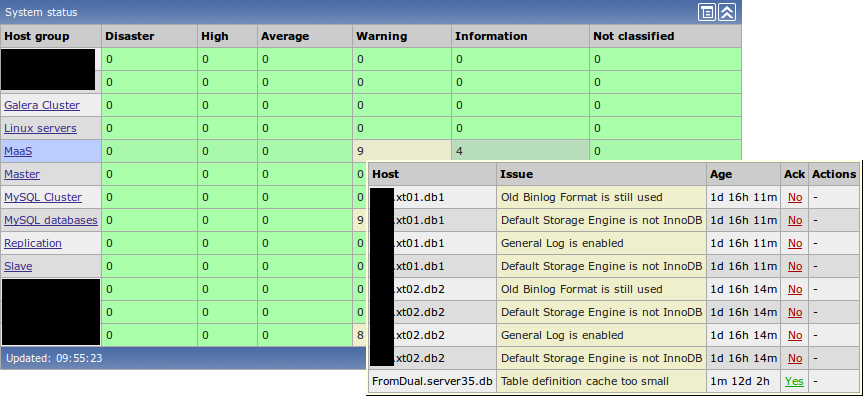
InnoDB
This server is mostly an InnoDB Server. We can see that we have some write traffic because the InnoDB Buffer Pool has constantly 15 - 20% of dirty …
Taxonomy upgrade extras: performance tuning, performance, enterprise monitor, monitoring, monitor, performance monitoring, performance monitor, graph, mpm, maas,
Categories:
ndb%count output
Hello amatus,
Not sure if I understood you correctly. But the output is in the following Before and After code boxes…
I have changed this now a bit for beeing more clear.
Please elaborate a bit more if I missed you. Regards, Oli
Taxonomy upgrade extras:
Categories:
Question
Excellent help with EXPLAIN command.. but.. I’m having issues.. why reason there’s no results after execute this: SHOW SESSION STATUS LIKE ’ndb%count’; ??
Taxonomy upgrade extras:
Categories:
I prefer MySQL binary tar balls with Galera...
In my set-ups I have different MySQL versions (MySQL 5.0, 5.1, 5.5 and 5.6, Percona Server 13.1 and 24.0, MariaDB 5.2.10, 5.3.3, Galera 1.0, 1.1 and 2.0) running in parallel at the same time.
Up to now I have not found a practical way yet to do this with RPM or DEB packages. If anybody knows how to do it I am happy to hear about it.
So I love and need only binary tar balls. Installation and removal is done within seconds and no remainings are left over after a removal. To operate the whole I use myenv.
Some software providers unfortunately do not provide binary tar balls at all or not in the form I want and need them. Thus I was thinking about how to get those by extracting them from packages. Up to now I have not had the time to write this down. But today was the right time…
RPM
rpm2cpio galera-22.1.1-1.rhel5.x86_64.rpm | cpio -vidm
tar czf galera-22.1.1-1.rhel5.x86_64.tar.gz usr
rm -rf usr
Extract with:
tar xf galera-22.1.1-1.rhel5.x86_64.tar.gz
DEB
ar vx galera-22.1.1-amd64.deb
mv data.tar.gz …
Taxonomy upgrade extras: installation, tar, galera, binary,
Categories:
MPM MaaS Questions & Answers
Question: How does the MPM MaaS agent send data to the service?
Answer: The MPM MaaS agents uses a simple HTML file upload to send data to the service.
Question: Is it possible to encrypt the data the MPM MaaS agent is sending to the service?
Answer: Currently the MPM MaaS agent only does a plain HTML file upload. So NO data encryption happens at the moment. If we see high demand of customers for this feature we will implement it.
Question: Is there a company behind this MySQL monitoring service?
Answer: Yes, there is: FromDual GmbH/LLC.
Taxonomy upgrade extras: mpm general,
Categories:
MPM Questions & Answers
Question: What is the MySQL Performance Monitor (MPM) monitoring and what data is the agent sending?
Answer: The MPM agent is gathering mainly the output of:
SHOW GLOBAL STATUS;
SHOW GLOBAL VARIABLES;
SHOW ENGINE INNODB STATUS;
and some data of the INFORMATION_SCHEMA and the PERFORMANCE_SCHEMA
Question: What MPM modules do you provide at the moment?
Answer: You can find a list of the provided modules here.
Taxonomy upgrade extras: mpm, maas, mpm general,
Categories:
Monitoring as a Service (MaaS) for MariaDB and MySQL
How to test MySQL Monitoring as Service (MaaS) for free?
To get MaaS for MySQL follow these steps:
- Request a MaaS trial service key. It will take up to 48 hours until you receive it. We only hand out trial service keys if your data are filled in correctly.
- Download the Performance Monitor for MySQL.
- Install the Performance Monitor for MySQL. The installation documentation is here.
- Run the Performance Monitor for MySQL with the configuration file we provide you by e-mail.
What is Monitoring as a Service (MaaS)?
Typical monitoring solution as for example the MySQL Enterprise Monitor, Nagios/Icinga, Cacti, Munin, etc. consist more or less of 2 components:
- A monitoring agent: This is a simple program that gathers the data and
- a monitoring service or server: This is the one who collects the data from all agents and generates alerts and nice graphs out of it.
In our MySQL Monitoring as a Service approach the agent gathers performance data of your MySQL databases and sends it to our FromDual MaaS service.
With …
Taxonomy upgrade extras:
Categories:
FromDual launches Monitoring as a Service for MySQL
On January 9th FromDual launched its Monitoring as a Service (MaaS) solution for MySQL. This service is based on the Performance Monitor for MySQL (mpm) v0.8 and Zabbix.
The installation on customer side of the so called monitoring agent takes about 5 minutes (for installation, configuration and scheduling).
The collected performance data are sent to our service where you can view them with your web browser. Some examples you can find here.
You can download the Performance Monitor for MySQL from our download page.
To use this service a key is needed which will be provided by FromDual. To request a key please use this form.
This service is free for FromDual support and consulting customers. For all others we offer a special enterprise customer monitoring subscription.
More information about MySQL Monitoring as a Service you can find here.
You can follow discussion about the MaaS on our forum.
InnoDB and NDB module are now under GPL!
Further we have the pleasure to announce that now all modules are available …
Taxonomy upgrade extras: monitoring, monitor, news, performance monitor, newsletter, mpm, maas,
Categories:
FromDual All (En)
FromDual InfoFeed (En)
VIP
Hello Reid,
Try to break it down into smaller pieces. Do the VIP manually first:
shell> ifconfig bond0 192.168.1.100 # or what ever you device is
Then try to ping it from local:
shell> ping 192.168.1.100
Then try to ping it from remote. If this works take it down again:
shell> ifconfig bond0 down
and continue with heartbeat.
Typically with virtual machines I have the problem of configuring the VM networking correctly. Did you make sure you can ping a normal IP from outside and between both nodes?
Taxonomy upgrade extras:
Categories:
Help with MySQL and HeartBeat
Hello,
I’ve been using VMware to test in a virtual environment (for financial reasons XD)…
I’m using your cookbook and I think its really the best guide I read so far. easy to understand and all. but right now I just had about more than ten times testing HA Heartbeat (especially I cannot ping the virtual IP 192.168.1.100), actually I was able to make DRBD work correctly,but I cannot seem to make heartbeat work.
T_T its a bit frustrating because I can’t make it work. Anyway, regarding the bonding I think its working. I am able to ping the bond0 for both servers.
Thanks in advance!
Taxonomy upgrade extras:
Categories:
Pages

