


Feed Aggregator
Learning from the Bugs Database
This week I came across an old known issue reported in May 2010: Master/Slave Replication with binlog_format = ROW and tables without a Primary Key is a bad idea! Especially if these tables are huge.
Why this is a bad idea is described in the bug report #53375:
if one runs DML on a table that has no indexes, a full table scan is done. with RBR, the slave might need to scan the full table for each row changed.
The consequence of this behaviour is that the Slave starts lagging. It was further mentioned:
Worst part is that
PROCESSLIST, etc provide absolutely NO obvious indication what is going on, for something that may take 12 hours, 3 days or even more…
Symptoms of this problem are described as follows:
Observe 78,278 row locks but only 10,045 undo log entries, so many more rows being scanned than changed. Also observer 16 row deletes per second but 600,754 row reads per second, same mismatch between counts suggesting unindexed accesses are happening.
You may also see “invalidating query …
Taxonomy upgrade extras: primary key, replication, row based replication (rbr), statement based replication (sbr),
MariaDB Deadlocks
We get ever and ever again customer requests concerning Deadlocks. First of all, Deadlocks are usually an application problem, not a database problem! The database itself manifests the application problem with the following message which is sent to the application as an error:
ERROR 1213 (40001): Deadlock found when trying to get lock; try restarting transaction
If your application receives this error message you know where in your application you have a problem. But a deadlock is always a problem between 2 different connections. So how you can find the other part of the problem?
The full Deadlock situation is shown with the following command:
SQL> SHOW ENGINE InnoDB STATUS<br>G
...
------------------------
LATEST DETECTED DEADLOCK
------------------------
2019-12-23 18:55:18 0x7f51045e3700
*** (1) TRANSACTION:
TRANSACTION 847, ACTIVE 10 sec starting index read
mysql tables in use 1, locked 1
LOCK WAIT 4 lock struct(s), heap size 1136, 3 row lock(s), undo log entries 1
MySQL thread id 46, OS thread …
Taxonomy upgrade extras: deadlock,
Anonymous PL/SQL block
Is this not just a simple an Anonymous PL/SQL Block?
Taxonomy upgrade extras:
Categories:
BEGIN NOT ATOMIC
I believe that the infinite loop example is just standard SQL. The only problem is that, in this context, BEGIN means START TRANSACTION. But you can use BEGIN NOT ATOMIC instead. A nice feature contributed by Antony Curtis.
Taxonomy upgrade extras:
Categories:
MariaDB Devroom at FOSDEM 2022 CfP is now open
Also in 2022 there will be a FOSDEM (Free and Open source Software Developers’ European Meeting) on 5 and 6 February 2022. This time again online from Brussels (Belgium).
MariaDB has again its own Devroom and the Call for Papers (CfP) is now open for your submissions. We are looking for interesting topics about your daily business, technical presentations, war stories, point of views of management, etc. The deadline for the CfP is before 21 December 2021.
For further information about how to submit a presentation please look here: https://mariadb.org/cfp-for-the-mariadb-devroom-fosdem-2022-now-open/
If you need any help or if you have any question please let us know…
Taxonomy upgrade extras: fosdem, 2022, developer, social event,
MariaDB Connection ID
The MariaDB Connection ID exists since long ago. So why bother about the Connection ID? Because it is interesting and you can do some interesting things with the Connection ID like tracking statements in your connections and find where they come from your application code.
The MariaDB Connection ID is a strictly monotonic increasing number starting with 1 at server restart:
shell> mariadb --user=root --execute='SELECT CONNECTION_ID()<br>G' | grep CONNECTION_ID
CONNECTION_ID(): 2372
shell> mariadb --user=root --execute='SELECT CONNECTION_ID()<br>G' | grep CONNECTION_ID
CONNECTION_ID(): 2373
shell> mariadb --user=root --execute='SELECT CONNECTION_ID()<br>G' | grep CONNECTION_ID
CONNECTION_ID(): 2374
The MariaDB documentation states
[1
]:
Returns the connection ID (thread ID) for the connection. Every thread (including events) has an ID that is unique among the set of currently connected clients.
The MariaDB documentation is only partly correct because the thread ID is something …
Taxonomy upgrade extras: connection, max_used_connections, general query log,
GRA_XXX_YYY.log
XXX means Thread ID (= Connection ID) and YYY wsrep transaction sequence number (wsrep_last_committed?):
snprintf(filename, len+1, "%s/GRA_%lld_%lld.log",
         wsrep_data_home_dir, (long long) thd->thread_id,
         (long long) wsrep_thd_trx_seqno(thd));
Taxonomy upgrade extras:
Categories:
MariaDB / MySQL Advanced training end of October 2021
From 25 to 29 October 2021 (calendar week 43) we will have another MariaDB / MySQL advanced training in the Linuxhotel in Essen (Germany). The training is in German and will take place on-site (3G!). There are still some places free!
More details about the training you can find here.
Taxonomy upgrade extras:
Upgrade of Galera Cluster takes more than 1 year
We currently have the situation that a customer cannot upgrade its hyper-consolidated Galera Cluster for more than a year because various different applications cannot, are not willing to or do not have the time to test against the newer version.
What what we suggest here: Create a new Galera Cluster with the new version and move over one project/application after the other to the new Cluster. This reduces complexity. You can do slightly progress and the pressure for the "slow-upgrader" increases over time.
Taxonomy upgrade extras:
Categories:
Automated MariaDB restore tests
Nearly everybody does backups. But nobody needs backups! What everybody wants and needs is a working restore not a working backup…
So how to make sure that your backup is working for the restore? There are a few things you can do already during your backup:
- Check that your backup was running fine. For example by checking the return code of your backup.
- Check the runtime of your backup. If the runtime of your backup significantly changed, it is worth to have a closer look at the backup.
- Check the size of your backup. If the size of your backup significantly changed, it is worth to have a closer look at your backup.
- And finally make your monitoring system aware if the backup was NOT running at all and if you are sure your backup is really triggered…
Backup test with FromDual Enterprise Tools
All this functionality is integrated in the newest releases of FromDual Backup and Recovery Manager for MariaDB and MySQL (brman) and the FromDual Performance Monitor for MariaDB and MySQL (fpmmm) in …
Taxonomy upgrade extras: backup, restore, brman, fpmmm, monitoring,
FromDual Backup and Recovery Manager for MariaDB and MySQL 2.2.4 has been released
FromDual has the pleasure to announce the release of the new version 2.2.4 of its popular Backup and Recovery Manager for MariaDB and MySQL (brman).
The new FromDual Backup and Recovery Manager can be downloaded from here. The FromDual Repositories were updated. How to install and use the Backup and Recovery Manager is described in FromDual Backup and Recovery Manager (brman) installation guide.
In the inconceivable case that you find a bug in the FromDual Backup and Recovery Manager please report it to the FromDual Bugtracker or just send us an [email](mailto:contact@fromdual.com?Subject=Bug report for brman).
Any feedback, statements and testimonials are welcome as well! Please send them to feedback@fromdual.com.
Upgrade from 2.x to 2.2.4
shell> cd ${HOME}/product
shell> tar xf /download/brman-2.2.4.tar.gz
shell> rm -f brman
shell> ln -s brman-2.2.4 brman
Changes in FromDual Backup and Recovery Manager 2.2.4
This release is a new minor release. It contains mainly bug fixes. We have tried to …
Taxonomy upgrade extras: backup, restore, recovery, pitr, brman, release, bman, rman, fromdual backup and recovery manager,
MariaDB Foreign Key Constraint example
Foreign Key Constraints are used to model a parent/child relation in an entity relationship (ER) model:
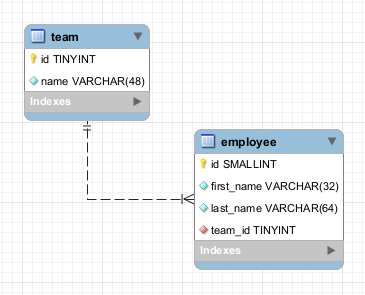
SQL> CREATE TABLE team (
  id TINYINT UNSIGNED NOT NULL AUTO_INCREMENT
, name VARCHAR(48) NOT NULL
, PRIMARY KEY (id)
);

SQL> CREATE TABLE employee (
  id SMALLINT UNSIGNED NOT NULL AUTO_INCREMENT
, first_name VARCHAR(32) NOT NULL
, last_name VARCHAR(64) NOT NULL
, team_id BIGINT UNSIGNED NOT NULL
, PRIMARY KEY (id)
, CONSTRAINT `fk_employee_team` FOREIGN KEY (team_id)
  REFERENCES team (id) ON DELETE CASCADE ON UPDATE RESTRICT
);
ERROR 1005 (HY000): Can't create table `test`.`employee` (errno: 150 "Foreign key constraint is incorrectly formed")
The same errors looks a bit different in MySQL 8.0:
ERROR 3780 (HY000): Referencing column 'team_id' and referenced column 'id' in foreign key constraint 'fk_team' are incompatible.
To see more details about this error you can look in the InnoDB status output:
SQL> SHOW ENGINE INNODB STATUS<br>G
...
------------------------
LATEST …
Taxonomy upgrade extras: innodb, foreign key, constraint,
Categories:
Monitoring your MariaDB database with SNMP
Table of Contents
- What is SNMP?
- SNMP Agent (snmptrap)
- SNMP Manager (snmptrapd)
- Test the SNMP Agent
- Creating your own MIB
- Sending MariaDB SNMP traps from PHP
- Literature
What is SNMP?
A customer recently had the question if an how his MariaDB database can be easily monitored with SNMP?
SNMP means Simple Network Management Protocol. It is a widely used and standardized protocol for monitoring the health of network and other devices (including services). In principle you can monitor nearly everything with SNMP.
On Linux a common implementation of SNMP is Net-SNMP, a suite of applications used to implement SNMP v1, SNMP v2c and SNMP v3 using both IPv4 and IPv6.
SNMP is a typical client-server architecture: The client which is collecting and sending the monitoring data is called agent and the server collecting all the monitoring data is called manager.
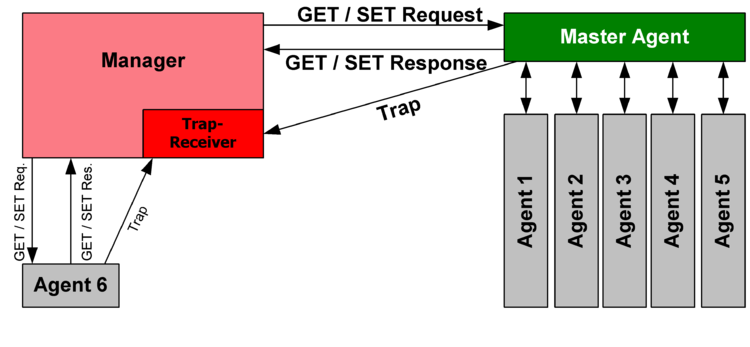 Source: Wikipedia: SNMP
An agent can be polled by the manager to collect the monitoring data (Request/Responses) or it can send monitoring data on its own …
Taxonomy upgrade extras: snmp, monitoring,
MariaDB/MySQL Environment MyEnv 2.0.3 has been released
FromDual has the pleasure to announce the release of the new version 2.0.3 of its popular MariaDB, Galera Cluster and MySQL multi-instance environment MyEnv.
The new MyEnv can be downloaded here. How to install MyEnv is described in the MyEnv Installation Guide.
In the inconceivable case that you find a bug in the MyEnv please report it to the FromDual bug tracker.
Any feedback, statements and testimonials are welcome as well! Please send them to [feedback@fromdual.com](mailto:feedback@fromdual.com?Subject=Feedback for MyEnv).
Upgrade from 1.1.x to 2.0
Please look at the MyEnv 2.0.0 Release Notes.
Upgrade from 2.0.x to 2.0.3
shell> cd ${HOME}/product
shell> tar xf /download/myenv-2.0.3.tar.gz
shell> rm -f myenv
shell> ln -s myenv-2.0.3 myenv
Plug-ins
If you are using plug-ins for showMyEnvStatus create all the links in the new directory structure:
shell> cd ${HOME}/product/myenv
shell> ln -s ../../utl/oem_agent.php plg/showMyEnvStatus/
Upgrade of the instance directory structure
From MyEnv …
Taxonomy upgrade extras: myenv, multi instance, virtualization, consolidation, saas, operations, release, mysqld_multi,
Query on target list
Hello Leo
Thank you for your question. What did you try so far? Or where did you stuck? Can you show us the query you have created so far?
An alternative would be to use HeidiSQL, MySQL Workbench or phpMyAdmin to design the right query.
Possibly the GROUP BY clause is what you are looking for. Please read here.
Regards, Oli
Taxonomy upgrade extras:
Categories:
Help with Query
Hello,
Thank you for this great blog post.We use suitecrm and we are having issues creating a query.
We have different target lists, for example Code violations Vacants Absentee … and we wanted to know how can we show the list of targets and sort them by the target list count?
For example joe doe - 3 list mary doe - 2 list peter doe - 1 list
This way we can see which record is in the most lists? and possible see what list they are in?
thank you
Taxonomy upgrade extras:
Categories:
Data Warehouse Design
This is my cheat sheet for dimensional modelling design techniques of a data warehouse (DWH) according to Kimball/Ross.
Dimensional Design Process (p. 38 ff.)
- Select the business process.
- Declare the grain (what a single fact table row represents).
- Identify the dimensions.
- Identify the facts.
Dimension Tables (p. 46 ff., p. 62 ff.)
who, what, where, when, why and how
- Dimension tables are entry point to the fact tables.
- Every dimension table has a single primary key (PK) column.
- Dimension tables are usually wide, flat denormalized tables.
- Use Surrogate Keys (synthetic Primary Keys) instead of Natural Keys (NK).
- Centipede facts should be avoided (year_dim + month_dim + day_dim vs date_dim).
- Resist the normalization urges and denormalize instead into a flattened row for simplicity and speed!
- Avoid cryptic abbreviations, use meaningful words instead.
- NULL comes from not yet populated attributes. Avoid NULL on dimensions use “Dummy strings” instead.
- A dimension can have different roles …
Taxonomy upgrade extras: design, data warehouse, dwh,
Categories:
Query performance comparison between MariaDB ColumnStore and other Storage Engines
Storage Engines like InnoDB, Aria and MyISAM are Row Stores. They store rows one after the other in blocks or even directly in a single file (MyISAM). On the other hand a Column Store like MariaDB ColumnStore stores all the same attributes (columns) of the rows together in chunks.
This is how the table sales_fact looks like:
CREATE TABLE `sales_fact` (
  `product_id` int(11) NOT NULL,
  `time_id` int(11) NOT NULL,
  `customer_id` int(11) NOT NULL,
  `promotion_id` int(11) NOT NULL,
  `store_id` int(11) NOT NULL,
  `store_sales` decimal(10,2) NOT NULL,
  `store_cost` decimal(10,4) NOT NULL,
  `unit_sales` int(11) NOT NULL
) ENGINE=ColumnStore DEFAULT CHARSET=utf8;

CREATE TABLE `sales_fact` (
  `product_id` int(11) NOT NULL,
  `time_id` int(11) NOT NULL,
  `customer_id` int(11) NOT NULL,
  `promotion_id` int(11) NOT NULL,
  `store_id` int(11) NOT NULL,
  `store_sales` decimal(10,2) NOT NULL,
  `store_cost` decimal(10,4) NOT NULL,
  `unit_sales` int(11) NOT NULL,
  KEY `i_sales_customer_id` (`customer_id`), …
Taxonomy upgrade extras: mariadb, data warehouse, columnstore, query, performance, myisam, dwh,
Galera Load Balancer SystemD Unit file
#
# /etc/systemd/system/glbd.service
#

[Unit]
Description=Galera Load Balancer Service
After=network.target

[Service]
#
# adjust the EnvironmentFile variable for your distribution
#
# On Redhat and derivatives it should be /etc/sysconfig/glbd.conf
#
# On Debian  and derivatives it should be /etc/default/glbd.conf
#
EnvironmentFile=/etc/sysconfig/glbd.conf
Type=simple
ExecStart=/usr/sbin/glbd --daemon --threads $THREADS --max_conn $MAX_CONN $OTHER_OPTIONS --control $CONTROL_ADDR $LISTEN_ADDR $DEFAULT_TARGETS

[Install]
WantedBy=multi-user.target
Taxonomy upgrade extras:
Categories:
The Galera Load Balancer Configuration file
#
# This is a configuration file for glbd service script
#
# On Red Hat and derivatives it should be placed in /etc/sysconfig/glbd.conf
#
# On Debian  and derivatives it should be placed in /etc/default/glbd.conf
#
# All settings besides LISTEN_ADDR are optional.
#

# Address to listen for client connections at. Mandatory parameter.
# To bind to all interfaces only port should be specified.
#LISTEN_ADDR="0.0.0.0:3306"

# Address for controlling connection. Mandatory part is port.
# If not specified control socket will not be opened
#CONTROL_ADDR="127.0.0.1 8081"

# Control FIFO name. It is opened always. glbd will refuse to start if
# this file already exists.
#CONTROL_FIFO="/var/run/glbd.fifo"

# Number of threads (connection pools) to use. It is always a good idea
# to have a few per CPU core.
#THREADS="4"

# Maximum connections. System open files limit will be modified to accommodate
# at least that many client connections provided sufficient privileges.
# Normally you should …
Taxonomy upgrade extras:
Categories:
Pages

