


Feed Aggregator
Is RethinkDB a possible solution for RRD SE?
When I dug through RethinkDB white papers I have seen that they make use of round-robin mechanisms.
We have to investigate a bit further to see if this can be used as a RRD SE and keep you informed…
Taxonomy upgrade extras:
Categories:
Managing sparse files on NTFS
Hello Shinguz,
NTFS is sparse file-capable too. However there is no tools to deal with it in convenient way. I have written one. Check the “SparseChecker” (http://www.opalapps.com/sparse_checker/sparse_checker.html). Current version is free.
I guess my post is relevant here because MySQL is available for Windows too. And for huge preallocated database files sparse regions (regions full of continuous zeroes) is a known problem, as well as disk and memory images for virtual machines and preallocated download manager’s files (pending downloads).
Best regards, Oleh
P.S. It would be interesting and valuable to hear your proffesional opinion about the SparseChecker as well as if it makes sense to port it to Linux.
Taxonomy upgrade extras:
Categories:
MySQL, where are you going?
Our presentation MySQL, where are you going? of March 25 at the OpenExpo in Bern is now available in German and English.
When you have missed it, you can download it now from here…
The video recording should be available as well soon.
Taxonomy upgrade extras: english, mysql, alternative, future,
Categories:
The FromDual Blogs
On this page you can find the various blogs of FromDual employees and some useful blog aggregates.
FromDual employee blogs
FromDual Sales Blog in English 

FromDual blog aggregates
MySQL Tech-Feed in German 
PostgreSQL Tech-Feed in German
PostgreSQL Tech-Feed in English
This page was translated using deepl.com.
Taxonomy upgrade extras:
Categories:
MySQL and MariaDB Configuration File template (my.cnf/my.ini)
The MySQL and MariaDB default configuration is not very great for production use. Some of the default values in my.cnf should be changed when you need it for business critical applications.
The following MySQL configuration file is in our opinion a good average configuration file for MySQL, Galera Cluster, MariaDB and Percona Server. For MySQL servers more performance tuning is not need in most cases.
Download the sample MySQL and MariaDB configuration file with wget directly from here.
Taxonomy upgrade extras: configuration, sample, my.cnf, my.ini, template,
Categories:
MySQL High-Availability (HA) solutions
The following solutions are used with MySQL:
- Redhat Cluster Suite (RHCS)
- SteelEye LiefKeeper
- Heartbeat (from the Linux HA project), Using Linux HA Heartbeat
- Crossroads
- Failover
- DRBD, Using MySQL with DRBD
- MySQL Cluster
Taxonomy upgrade extras: high availability, ha, drbd, architecture, heartbeat,
Categories:
The MySQL CSV Storage Engine
A little summary about the MySQL CSV table engine:
- The SQL-Demo script (930 byte) for the following article.
- The CSV converter to convert normal CSV files into a CSV format which is for MySQL acceptable.
Caution: Use on your own risk!
MySQL CSV tables (internally also called TINA tables) are driven by the MySQL CSV storage engine. This feature was added in MySQL release 4.1.4. CSV tables store data in text files using the Character-Separated-Value format.
mysql> SELECT version();
+------------+
| version()  |
+------------+
| 5.0.16-max |
+------------+
CSV tables are an equivalent to Oracle external tables. They can be use to import data from your favourite spread sheet software (e.g. OpenOffice Calc), exchange data from or with other data sources or just migrating data from an other database system to MySQL.
To enable CSV tables, use the --with-csv-storage-engine option during configure when you build MySQL. If you got a already compiled MySQL binary you can find out if CSV tables are supported like …
Taxonomy upgrade extras: storage engine, csv,
Categories:
MySQL Cluster analysis for foodmart
This is an automated analysis of the DBI:mysql:database=foodmart;host=localhost database for migration into MySQL Cluster. No warranty is made to the accuracy of the information.
This information should be valid for MySQL 4.1 and 5.0. Since 5.1 is not a final release yet, the numbers should be used as a guide only.
5.1-dd is for tables stored on disk. The ndb_size.pl estimates are experimental and should not be trusted. Notably we don’t take into account indexed columns being in DataMemory versus non-indexed on disk.
Parameter Settings
NOTE the configuration parameters below do not take into account system tables and other requirements.
| Parameter | 4.1 | 5.0 | 5.1 |
|---|---|---|---|
| DataMemory (kb) | 38624 | 38624 | 37088 |
| IndexMemory (kb) | 53816 | 44840 | 44840 |
| MaxNoOfTables | 21 | 21 | 21 |
| MaxNoOfAttributes | 225 | 225 | 225 |
| MaxNoOfOrderedIndexes | 64 | 64 | 64 |
| MaxNoOfUniqueHashIndexes | 64 | 64 | 64 |
| MaxNoOfTriggers | 256 | 256 | 256 |
Memory usage because of parameters
Usage is in kilobytes. Actual usage will vary as you should set the parameters …
Taxonomy upgrade extras: mysql cluster, memory, sizing, foodmart,
Categories:
ndb_size.pl report for database foodmart (21 tables)
Connected to: DBI:mysql:database=foodmart;host=localhost
Including information for versions: 4.1, 5.0, 5.1
Table List
- account
- account_account_id$unique
- category
- category_category_id$unique
- currency
- currency_currency_id_date$unique
- customer
- customer_customer_id$unique
- days
- department
- department_department_id$unique
- employee
- employee_employee_id$unique
- expense_fact
- inventory_fact
- position
- position_position_id$unique
- product
- product_class
- product_product_id$unique
- promotion
- promotion_promotion_id$unique
- region
- reserve_employee
- reserve_employee_employee_id$unique
- salary
- sales_fact
- store
- store_store_id$unique
- time_by_day
- warehouse
- warehouse_class
account
DataMemory for Columns
* means varsized DataMemory
| Column Name | Type | Varsized | Key | 4.1 | 5.0 | 5.1 |
|---|---|---|---|---|---|---|
| account_parent | smallint(6) | MUL | 4 | 4 | 4 | |
| account_description | varchar(30) | Y | 32 | 32 | 16* | |
| account_rollup | varchar(30) | Y | 32 | 32 | 4* | |
| HIDDEN_NDB_PKEY | bigint | PRI | 8 | 8 | 8 | |
| account_type | varchar(30) | Y | 32 | 32 | 8* | |
| account_id | smallint(6) | UNI | 4 | 4 | 4 | |
| custom_members … |
Taxonomy upgrade extras:
Categories:
MySQL Architectures Overview
Database Architecture & Design
Application logic in the middle tier?
Reduce money spent on software licenses by moving logic to the middle tier. This means moving stored procedures into the application server or web server layer where it is much cheaper to scale out. Reducing or eliminating business logic running in the DB may reduce Database CPU utilisation and hence save support costs for the DB Portability is key! [1]
The complete Open Source MySQL High Availability and Scale-Out Architecture Stack
Click on the map to get to you favourite mater…
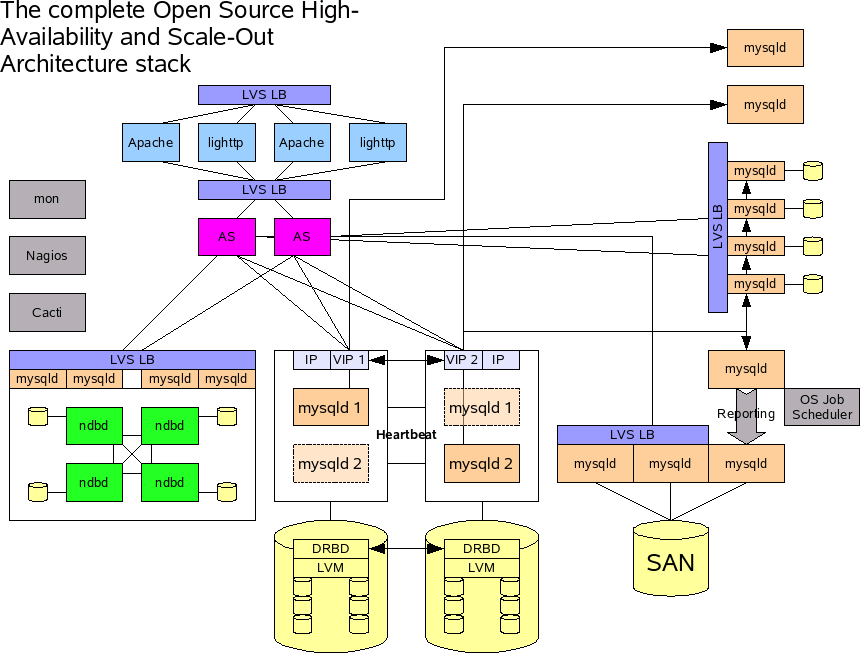
Legend
- DRBD: Distributed Replicated Block Device
- LVM:Logical Volume Manager
- Lighttp: light footprint + httpd = LightTPD (pronounced lighty)
- Cacti: Official Cacti website
- Nagios: Nagios is an open source host, service and network monitoring program.
- mon: mon is a scheduler and alert management tool used for monitoring service availability and triggering alerts upon failure detection
- MySQL Cluster MySQL Cluster documentations
- LVS: Linux Virtual Server. A …
Taxonomy upgrade extras: mysql, architecture,
Categories:
What's going on when MySQL does operations on Partitions
Following question came up recently: What happens if you drop or add a partition of an existing already partitioned table with ALTER TABLE? Will it be copied or will just the single partition be dropped and added? How are the index(es) rebuild after such a drop/add?
In the MySQL documentation were not to many details mentioned:
ALTER TABLE … ADD PARTITION creates no temporary table except for MySQL Cluster.
…
ADD or DROP operations for RANGE or LIST partitions are immediate operations or nearly so. ADD or COALESCE operations for HASH or KEY partitions copy data between changed partitions
…
If other cases, MySQL creates a temporary table, even if the data wouldn’t strictly need to be copied …
So it would be interesting to find out what happens. Because I am not a developer I am not able to read code. So I have to find it out somehow different:
We need the following Tool: MySQL Super Smack
With gen-data from MySQL Super Smack we generate some data:
./gen-data -n 1000000 -f …
Taxonomy upgrade extras: operations, partition,
Categories:
Operating System Signals on different platforms
shell> kill -l
Linux
| 1) SIGHUP | 2) SIGINT | 3) SIGQUIT | 4) SIGILL |
| 5) SIGTRAP | 6) SIGABRT | 7) SIGBUS | 8) SIGFPE |
| 9) SIGKILL | 10) SIGUSR1 | 11) SIGSEGV | 12) SIGUSR2 |
| 13) SIGPIPE | 14) SIGALRM | 15) SIGTERM | 16) SIGSTKFLT |
| 17) SIGCHLD | 18) SIGCONT | 19) SIGSTOP | 20) SIGTSTP |
| 21) SIGTTIN | 22) SIGTTOU | 23) SIGURG | 24) SIGXCPU |
| 25) SIGXFSZ | 26) SIGVTALRM | 27) SIGPROF | 28) SIGWINCH |
| 29) SIGIO | 30) SIGPWR | 31) SIGSYS | |
| 34) SIGRTMIN | 35) SIGRTMIN+1 | 36) SIGRTMIN+2 | |
| 37) SIGRTMIN+3 | 38) SIGRTMIN+4 | 39) SIGRTMIN+5 | 40) SIGRTMIN+6 |
| 41) SIGRTMIN+7 | 42) SIGRTMIN+8 | 43) SIGRTMIN+9 | 44) SIGRTMIN+10 |
| 45) SIGRTMIN+11 | 46) SIGRTMIN+12 | 47) SIGRTMIN+13 | 48) SIGRTMIN+14 |
| 49) SIGRTMIN+15 | 50) SIGRTMAX-14 | 51) SIGRTMAX-13 | 52) SIGRTMAX-12 |
| 53) SIGRTMAX-11 | 54) SIGRTMAX-10 | 55) SIGRTMAX-9 | 56) SIGRTMAX-8 |
| 57) SIGRTMAX-7 | 58) SIGRTMAX-6 | 59) SIGRTMAX-5 | 60) SIGRTMAX-4 |
| 61) SIGRTMAX-3 | 62) SIGRTMAX-2 | 63) SIGRTMAX-1 | 64) SIGRTMAX |
Solaris 10 (x86, Sparc)
| 1) SIGHUP | 2) SIGINT | 3) SIGQUIT | 4) SIGILL |
| 5) SIGTRAP | 6) SIGABRT | 7) SIGEMT | 8) SIGFPE … |
Taxonomy upgrade extras: operating system, signal, platform, kill,
Categories:
Quick links to the MySQL documentation
MySQL Statement Syntax
Data Definition Language (DDL) Statements
Data Manipulation Language (DML) Statements
| CALL | DELETE | DO | HANDLER |
| INSERT | LOAD DATA INFILE | REPLACE | SELECT |
| TRUNCATE TABLE | UPDATE |
MySQL Utility Statements
| DESCRIBE | EXPLAIN | HELP | USE |
MySQL Transactional and Locking Statements
| START TRANSACTION | COMMIT | ROLLBACK | SAVEPOINT |
| ROLLBACK TO SAVEPOINT | LOCK TABLES | UNLOCK TABLES | SET TRANSACTION |
| XA Transactions |
Account Management Statements
| CREATE USER | DROP USER … |
Taxonomy upgrade extras: documentation, general query log,
Categories:
MySQL Cluster overview
This is a chaotic collection of my MySQL Cluster experience…
Table of Contents
- config.ini template
- my.cnf template
- General Rules and/or experience
- MySQL Cluster restore
- Skript for converting tables to NDB (alter_engine.pl)
- MySQL Cluster memory sizing
config.ini template
A generic MySQL Cluster configuration file (config.ini) to start with. It is pretty much what the MySQL Cluster experts recommend right now:
#
# config.ini
#

# This configuration file is fore MySQL Clusters 6.2 and above...

# ----------------------------------------------------------------------

[TCP DEFAULT]

# Default is too small!
SendBufferMemory              = 2M
ReceiveBufferMemory           = 2M


# When this is configured together with section above ndb_mgmd will
# return with erro -1 (255). This is a bug and should be fixed earlier
# or later!
# When you move this section to the bottom it should work.
# You need one TCP section for EACH cluster node pair!
# (for example: 4 nodes = 6 sections)

# [TCP]
#
# NodeId1: 10
# …
Taxonomy upgrade extras: mysql cluster,
Categories:
MySQL Cluster memory sizing
MySQL Cluster is pretty fast. The reason for this is, that it is completely memory based. Nowadays memory is still, in contrary to disk, limited to your systems. Thus, before installing a MySQL Cluster you have to calculate the amount of memory you need.
To say it in advance: You should consider to only use 64-bit Linux system with huge amount (4 - 64 GB) of RAM!
In release 5.1 MySQL Cluster became disk based. Now you have the possibility to swap out some data to disk. How much it is we will probably see a little further down…
Calculating or estimating
For calculating or estimating how much Memory you need, you have several different possibilities:
- You can do it by hand.
- This OO calc spread sheet helps you.
- You can have it much easier by using ndb_size.pl (or the newer not yet official released version → link).
- Or you can extrapolate from a consisting data set.
Memory usage
First we want to see where memory is used in Cluster. When we do a ps we know how much memory our cluster process allocates:
# …Taxonomy upgrade extras: mysql cluster, memory, sizing,
Categories:
MySQL hints
Table of Contents
- Result set with temporary sequence
- Determination of optimal length of prefixed indexes
- Using MySQL keywords in table or columm names
- Missing Primary Key Index
- Problems while installing a MySQL 5.5 database
- InnoDB AUTO_INCREMENT at 2nd position
Result set with temporary sequence
Sometimes you would like to have a result set with something like a rownum. You can do this at least in the following two ways:
a) with a TEMPORARY MEMORY table:
CREATE TEMPORARY TABLE mem (
    seq  INT NOT NULL AUTO_INCREMENT PRIMARY KEY
  , data VARCHAR(32)
) ENGINE=MEMORY;

INSERT INTO mem
SELECT NULL, data
  FROM test
 LIMIT 5;

SELECT *
  FROM mem;

+-----+------+
| seq | data |
+-----+------+
|   1 | abc  |
|   2 | def  |
|   3 | ghi  |
|   4 | abc  |
|   5 | def  |
+-----+------+
b) with a user defined variable
SET @seq=0;
SELECT @seq:=@seq+1, data FROM test WHERE id < 100 LIMIT 5;
+--------------+------+
| @seq:=@seq+1 | data |
+--------------+------+
|            1 | abc  |
|            2 | def  |
| …
Taxonomy upgrade extras: mysql, migration, innodb, hint, primary key, index, prefixed index, sequence, temporary, keyword, auto_increment, memory table,
Categories:
DBA wisdoms
Controlling developers is like herding cats.
Oh no, it's not. It's much harder than that!
Do not assume!
Backups ist was für Warmduscher!
(engl. Backup is for sissies!)
Yesterday (the DBA version)
Yesterday, All those backups seemed a waste of pay. Now my database has gone away. Oh I believe in yesterday.
Suddenly, There's not half the files there used to be, And there's a milestone hanging over me The system crashed so suddenly.
I pushed something wrong What it was I could not say. Now all my data's gone and I long for yesterday-ay-ay-ay.
Yesterday, The need for back-ups seemed so far away. I knew my data was all here to stay Now I believe in yesterday.
The SISO DB principle: Shit In - Shit Out
Der altehrwürdigste aller …
Taxonomy upgrade extras: backup, dba, tuning, database administrator,
Categories:
MySQL trouble shooting
Table of Contents
max_open_fileswarning duringmysqldstartup- Troubles after NON recommended upgrade path
Com_*counters not updated inSHOW STATUSERROR 1300 (HY000): Invalid utf8 character string- MySQL crashes during import
- MySQL workbench gives an openGL error
max_open_files warning during mysqld startup
Problem
[Warning] Changed limits: max_open_files: 1024  max_connections: 100  table_cache: 457

[Warning] Could not increase number of max_open_files to more than 1024 (request: 1070)
Explanation
The operating system hard limit of open files was exceeded.
Analysis
Finding the soft and hard limits of open files for your account you can find like this:
# ulimit -Sa | grep "open files"
open files                    (-n) 1200

# ulimit -Ha | grep "open files"
open files                    (-n) 8192
This corresponds to:
mysql> show variables like ...
+-------------------+-------+
| Variable_name     | Value |
+-------------------+-------+
| open_files_limit  | 1200  |
| table_cache …
Taxonomy upgrade extras: trouble shooting, open_files_limit, table_open_cache, limitnofile,
Categories:
MySQL Questions & Answers
Table of Contents
- Search with special characters
- Why is InnoDB disabled?
- How to find MySQL system information?
- What is the difference between MySQL certified server and community server?
- MySQL monitoring
- MySQL backup
- Corrupt MyISAM table
- How to compile MySQL
- Test restore procedure
- Reset a MySQL user password
- Reset the MySQL root user password
- How to enable the InnoDB plugin
- Storage Engines shipped with MariaDB / MySQL
- Compiling MySQL Cluster ndb-test fails
- NDB information schema does not show up
- Hyper Threading (HT) enabled?
- How to make a patch for MariaDB?
- Where does the InnoDB AUTO-INC waiting come from?
- My character encoding seems to be wrong. How can I fix it?
- I think my Slave is not consistent to its Master any more. How can I check this?
- My MySQL Server is swapping from time to time. This gives hick-ups in MySQL. How can I avoid this?
- How can I find which I/O scheduler my device is using?
- How can I find why my mail is not sent?
Search with special characters
This Question has been moved to the Forum. …
Taxonomy upgrade extras: backup, restore, recovery, mysql cluster, innodb, monitoring, lvm, myisam, snapshot, compiling, swap,
Categories:
Limitations of MySQL
Often asked but informations are spread around: The limitations of MySQL.
If you know any other MySQL limitations, please let us know.
Table of Contents
- General limitations of MySQL
- Limitations of MySQL 4.1
- Limitations of Joins
- Limitations of the MyISAM storage engine
- Limitations of MySQL 5.0
- Limitations of Joins
- Limitations of the MyISAM storage engine
- Limitations of InnoDB
- Limitations of MySQL 5.1
- Limitations of Joins
- Limitations of Partitions
- Limitations of MySQL Cluster
- Limitations in Galera Cluster for MySQL
General limitations of MySQL
32-bit binaries cannot address more than 4 Gbyte of memory. This is not a MySQL limitation, this is a technical limitation.
BLOB’s are limited to 1 Gbyte in size even thought you use LONGBLOB because of a limitation in the MySQL protocol: The protocol limit for max_allowed_packet is 1GB.
Limitations of MySQL 4.1
Limitations of Joins
In MySQL 4.1, the maximum number of tables that can be referenced in a single join is 61. This also applies to the number …
Taxonomy upgrade extras: mysql, mysql cluster, limitation, limitations, galera, general query log,
Categories:
Pages

