


Feed Aggregator
MySQL User Defined Function (UDF) collection
I really like this new toy called UDF. So I try to provide some more, hopefully useful, functionality.
A list of what I have done up to now you can find here:
- Query and change InnoDB spin_wait_delay: udf_spin_wait_delay.tgz
- Send message to the MySQL error log: udf_log_error.tgz, works also with MySQL 5.1.42
If you have some more suggestions, please let me know. If you need some special features as UDF talk to our consulting services if they can implement it.
Get and set InnoDB spin_wait_delay
mysql> CREATE FUNCTION spin_wait_delay
       RETURNS INTEGER SONAME "udf_spin_wait_delay-5.1.30-linux-i686-glibc23.so";

mysql> SELECT spin_wait_delay();
+--------------------+
| spin_wait_delay(5) |
+--------------------+
|                  5 |
+--------------------+

mysql> SELECT spin_wait_delay(8);
+--------------------+
| spin_wait_delay(8) |
+--------------------+
|                  8 |
+--------------------+

mysql> DROP FUNCTION spin_wait_delay;
Send message to MySQL error log
mysql> …Taxonomy upgrade extras: udf, user defined function,
Categories:
The handler_read_* status variables
Because I do a lot of Performance Tuning gigs I get often in contact with these status variables. In the beginning I had a problem to understand them and now I have a problem to memorize the relation of the name and the meaning. Therefore I wrote this little summary:
Prepare the example
To show you the effect I have worked out a little example:
CREATE TABLE test (
    id    INT UNSIGNED NOT NULL AUTO_INCREMENT PRIMARY KEY
  , data  VARCHAR(32)
  , ts    TIMESTAMP
  , INDEX (data)
);

INSERT INTO test
VALUES (NULL, 'abc', NOW()), (NULL, 'abc', NOW()), (NULL, 'abd', NOW())
     , (NULL, 'acd', NOW()), (NULL, 'def', NOW()), (NULL, 'pqr', NOW())
     , (NULL, 'stu', NOW()), (NULL, 'vwx', NOW()), (NULL, 'yza', NOW())
     , (NULL, 'def', NOW())
;

SELECT * FROM test;
+----+------+---------------------+
| id | data | ts                  |
+----+------+---------------------+
|  1 | abc  | 2008-01-18 16:28:40 |
|  2 | abc  | 2008-01-18 16:28:40 |
|  3 | abd  | 2008-01-18 16:28:40 |
|  4 | acd  | 2008-01-18 16:28:40 | …
Taxonomy upgrade extras: mysql, handler, handler interface, status variables, status,
Categories:
Performance Tuning Key for MySQL
This MySQL Performance Tuning Key should give you a guide how to best tune you MySQL database systematically… It should also work similar for other RDBMS.
Also check our MySQL Performance Monitor
For a database configuration tuning only please look first at our MySQL database health check.
If this MySQL Database Health Check does NOT solve your problem our specialized Performance Tuning and Architecture Consultants can help you for sure!
Caution: Some recommendations are dangerous! Dangerous means you can loose or get inconsistent data in certain cases. Only use them if you know what you are doing!!!
Acknowledgement
Thanks to the following people for hints:
- Jens Bollmann
Efficiency of Performance Tuning measurements
Before you start tuning you should think about the following graph:
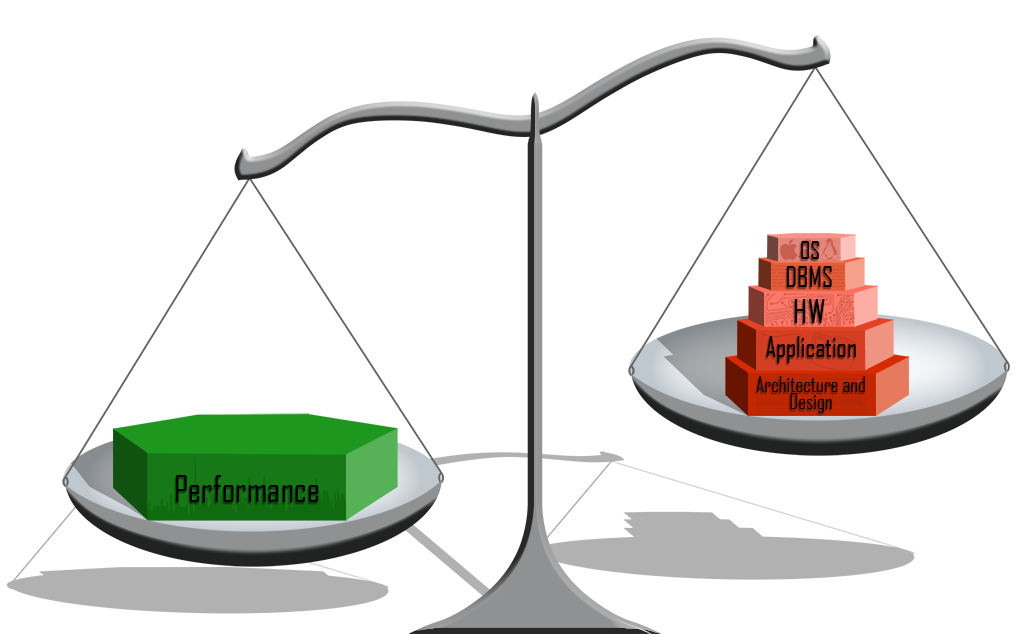
And see also Relative Impact on Performance (p. 33 ff.)
Start
(last updated 2010-10-03)
000. Do you have performance problems?
001. Have you …
Taxonomy upgrade extras: mysql, performance, tuning,
Categories:
Hunting the core
Core files under Linux
When dealing with MySQL crashes it is very useful to get the core files for further debugging. I have collected all the informations I found about it and wrote it together here:
Find core files
# find $HOME -name "core*"
/home/oli/core.6440

# file core
core:      ELF 32-bit LSB core file Intel 80386, version 1 (SYSV), SVR4-style
See who caused the core file:
# strings core.6440 | head
CORE
CORE
mysqld
/home/mysql/product/mysql-5.1.30/bin/mysqld --defaults-file=/home/mysql/product
...
Soft and hard limit of core files size
(in blocks of 512 byte?→seems to be 1k blocks!)
# ulimit -Sc
# ulimit -Hc
# ulimit -c unlimited
Getting an setting core file pattern
# cat /proc/sys/kernel/core_pattern
core
# cat /proc/sys/kernel/core_uses_pid
0
# echo "1" > /proc/sys/kernel/core_uses_pid
# echo "/tmp/corefiles/core" > /proc/sys/kernel/core_pattern
Provoke a core dump
# kill -s SIGSEGV $$

or

# kill -11 <pid>
Dump more information
# cat …Taxonomy upgrade extras: debug, trace, core,
Categories:
Reading other processes memory
As you probably have experienced yet MySQL does not always provide all internal information as you might want to have them and as you are used to have from other RDBMS.
MySQL plans to improve this implementing the/a performance schema and its probably already partly done in MySQL 5.4. But who knows when this will be finished and what it contains at all…
What is not provided to me I want to gather myself… But how? Other RDBMS provide interfaces to attach applications directly to their memory to retrieve information. But MySQL does not. So I was looking for a way to read an other process memory.
I have no clue about programming and thus changing MySQL code was out of focus. Further I am looking for a solution you can use immediately on a running systems at consulting gigs. Some tries to read /proc/
<pid
>/mem with a little php script failed.
An article by Domas M. helped me. I do not have to write something myself I can use a tool already existing to do the work. But gdb is not installed on …
Taxonomy upgrade extras: process, memory, debug, trace,
Categories:
MySQL Monitoring solutions
Basic solutions (CLI)
Those solutions are run from the command line (CLI):
- top (man)
- vmstat (man)
- iostat (man), mpstat (man), pidstat in package sysstat
- mytop, a Mytop Introduction
- dstat
- free (man)
- procinfo (man)
- mpstat (man)
- mTop
- InnoTop
Advanced solutions
More advanced MySQL database and host monitoring solutions with graphs and/or history and/or hints are:
| MySQL Performance Monitor | The FromDual Performance Monitor for MySQL/MariaDB is a monitoring solution based on Zabbix. It is freely available. More information about it you can find here. |
| MySQL Enterprise Monitor | The MySQL Enterprise Monitor (aka Merlin or MEM) serves as an automated assistant for MySQL database administrators. For MySQL customers only! |
| cmon | CMON - the Cluster Monitor for MySQL Cluster. CMON is the most comprehensive monitor for MySQL Cluster and collect all information that is possible to collect from the data nodes and management servers. |
| MySQL Activity Report | The MySQL Activity Report package is a tool to help MySQL … |
Taxonomy upgrade extras: performance tuning, mysql, monitoring, performance monitoring, mytop, innotop,
Categories:
FromDual sitemap
Performance Tuning, Benchmarking, Capacity Planning and Monitoring
MySQL Database Health Check for MySQL/MariaDB
Wie der MySQL Optimizer schummelt, wenn es um MySQL Cluster geht…
How the MySQL Optimizer with MySQL Cluster is cheating you…
My thoughts about MySQL (Cluster) replication
My wish for the New Year: MySQL DBA’s, please install iostat on your servers!
Backup/Restore/Recovery, Operations and Consulting
What’s going on when MySQL does operations on partitions?
FromDual consulting tool collection
MySQL Configuration File sample (my.cnf/my.ini)
MyEnv for Multi-Database set-ups
Logging users to the MySQL error log
Architecture, Design and High Availability
Stealthy migrating MySQL tables and MySQL data access interfaces using enlarged …
Taxonomy upgrade extras: document, article, summary, overview, content,
Categories:
Profiling MySQL with oprofile
Why is is data load with LOAD DATA INFILE so much faster?
Probably the answer to this question is already known. But we want to prove it and by the way learn to deal with oprofile.
For the test MySQL 5.0.28 was used and 100k rows were loaded into a table sales which looks as follows:
CREATE TABLE sales (
    sales_id       INT UNSIGNED NOT NULL AUTO_INCREMENT PRIMARY KEY
  , product_name   VARCHAR(128) NOT NULL
  , product_price  DECIMAL(8,2) NOT NULL
  , product_amount SMALLINT     NOT NULL
) ENGINE = MyISAM;
The following load times were messured:
| Test | MyISAM | InnoDB | Remarks |
|---|---|---|---|
| LOAD DATA INFILE | 0.85 s | 2.51 s | |
| Multi row INSERT | 2.69 s | 4.48 s | |
| Single row INSERT | 15.0 s | 881 s | [ 1 ] |
| Single row INSERT w/o LOCK TABLE | 15.1 s | 18.1 s | [ 2 ] |
But now we want to know what happens into mysqld during this load. For measuring this see also:
opcontrol --init
opcontrol --setup --separate=lib,kernel,thread --no-vmlinux
opcontrol --start-daemon
ps axuwww| grep opro
opcontrol --start
do the …
Taxonomy upgrade extras: mysql, profiling, oprofile, profile,
Categories:
Materialized Views with MySQL
Table of Contents
- What is a Materialized View?
- Implement your own Materialized Views
- Refreshing materialized views
- Hands on
- Create your own Materialized View:
- Refresh Materialized View on demand
- Refresh Materialized View immediate
- Materialized Views with snapshotting functionality
- Some performance benchmarks for our Materialized Views:
- Outlook
- Conclusion
- Literature
What is a Materialized View?
A Materialized View (MV) is the pre-calculated (materialized) result of a query. Unlike a simple VIEW the result of a Materialized View is stored somewhere, generally in a table. Materialized Views are used when immediate response is needed and the query where the Materialized View bases on would take to long to produce a result. Materialized Views have to be refreshed once in a while. It depends on the requirements how often a Materialized View is refreshed and how actual its content is. Basically a Materialized View can be refreshed immediately or deferred, it can be refreshed fully or to a certain point in time. …
Taxonomy upgrade extras: mysql, trigger, materialized views, materialised views, sql/psm,
Categories:
MySQL Federated Storage Engine
What is a Federated Table?
A Federated Table is a table which points to a table in an other MySQL database instance (mostly on an other server). It can be seen as a view to this remote database table. Other RDBMS have similar concepts for example database links.
What can I do with a Federated Table?
To show what you can do with a federated table let us assume the following constellation: Two MySQL databases on two different servers. The first one called provider (it provides the data) the second one called requester (it requests the data). For a better understanding see the following example:
CREATE TABLE provider (
    a  INT UNSIGNED NOT NULL AUTO_INCREMENT PRIMARY KEY
  , b  VARCHAR(32) NULL
  , INDEX b_i (b)
) ENGINE = MyISAM;

INSERT INTO provider
VALUES (NULL, 'Apfel'), (NULL, 'Birne'), (NULL, 'Pflaume')
     , (NULL, 'Banane'), (NULL, 'Kirsche'), (NULL, 'Quitte');

SELECT * FROM provider;
CREATE TABLE requester (
    a  INT UNSIGNED NOT NULL …
Taxonomy upgrade extras: storage engine, federated tables, general query log,
Categories:
FromDual consulting tool collection
The following tools we use sometimes for our consulting engagements…
Caution: These tools are NOT for production use! Use with care!
Other tools
FromDual also provides some other tools:
- Database Health Check for MySQL
- FromDual consulting tools for MySQL
- Performance Tuning Key for MySQL
- MyEnv MySQL Environment (Multi Instance operation scripts)
3rd party tools for MySQL
Other 3rd party tools for MySQL you should consider are:
- Maatkit
- mylvmbackup
- mytop
- innotop
- InnoDB recovery tools
- mysql-snmp
- mysql-cactii-templates
- IRQ balance
- RackerHacker MySQLTuner
- MySQLTuner (by Major Hayden)
- MySQL Tuning Primer (by Matthew Montgommery)
- AutoMySQLBackup
- mmmf, multi-master mysql failover Download
- Multi-Master Replication Manager for MySQL Download
Tools
- allocate.c
- backslashG2table.pl
- general2bench.pl
- memuse.pl
- memwaster.c
- MySQLprofiler
- pointer_size.c
- alter_engine.pl
- commit_demo.pl
- test.sh
- vm_mon.sh
- read_process_memory.c
- read_process_memory.sh
- cluster_initial_test.pl
- mem_map.pl
- csv_converter.pl
- mem_tracker.sh …
Taxonomy upgrade extras: tool, consulting, memory, san, general query log,
Categories:
MariaDB and MySQL Benchmarking
Table of Contents
- Database Benchmark
- General Benchmarking Tools
- CPU Benchmarking
- Disk benchmarking
- Network Benchmarking
- Application Stress Testing
Database Benchmark
- sysbench (filesystems and OS/HW tests), Sysbench source, sysbench v0.5, sysbench scripts
- OSDL Database Test Suite (download)
- DBT2 (TPC-C, OLTP), DBT2 Benchmark Tool for MySQL
- DBT3 (TPC-H, complex and long running queries, data warehouse (DWH))
- TM1 (3rd party, ODBC, telecom benchmark)
- TPC Benchmarks
- TPCC-mysql
- db_STRESS
- HammerDB
- db_bench
- Acronis perfkit (benchmark, benchmark-db)
- Web3Bench (TiDB, MySQL written in Java/Python)
- Finch (Finch is a MySQL benchmark tool developed for software engineers and modern infrastructures.)
General Benchmarking Tools
- Apache JMeter: To test performance on static and dynamic resources (files, Servlets, Perl scripts, Java Objects, Data Bases and Queries, FTP Servers and more).
- Gatling: Gatling is a highly capable load testing tool. It is designed for ease of use, …
Taxonomy upgrade extras: performance tuning, mysql, benchmark, bechmarking, performance, database, network, data warehouse,
Categories:
MySQL pluggable Storage Engines (SE)
One of the big advantages of MySQL is its concept of Pluggable Storage Engines. This means you can choose the most optimal Storage Engine for your needs. This also has a disadvantage: You have to know what you are doing…
If you need some help deciding which is the right Storage Engine or even strategy for you or if you want us to make an independent and vendor neutral comparison of those Storage Engines consider our FromDual Consulting Services!
MySQL provides the following storage engines:
mysql> SHOW ENGINES;

+------------+----------+-------------------------------------------------------+
| Engine     | Support  | Comment                                               |
+------------+----------+-------------------------------------------------------+
| ARCHIVE    | YES      | Archive storage engine                                |
| BerkeleyDB | NO       | Transactional storage engine with page-level locking  |
| BLACKHOLE  | YES      | /dev/null storage engine for replication transmission |
| …
Taxonomy upgrade extras: storage engine, pluggable, solid state disk, rrd, round-robin database, se, architecture, ssd, memory table, data warehouse,
Categories:
FromDual - The MySQL consulting company goes operational today!
[http://www.blogger.com/profile/11195863756524022642 Shinguz] said…
Hi Ivan
Thanks a lot for your wishes!
Indeed it started very interesting yet… :)
Oli
Taxonomy upgrade extras:
Categories:
FromDual - The MySQL consulting company goes operational today!
[http://www.blogger.com/profile/04013184952866618726 Ivan] said…
Oli!
I wish you all the best and good luck!
I am sure that this new adventure will give you lots of gratification.
Cheers, -ivan
Taxonomy upgrade extras:
Categories:
FromDual - The MySQL consulting company goes operational today!
[http://www.blogger.com/profile/11195863756524022642 Shinguz] said…
Hello Henrik,
Thank you very much for your wishes and all you have done already!
Oli
Taxonomy upgrade extras:
Categories:
FromDual - The MySQL consulting company goes operational today!
[http://www.blogger.com/profile/09201666166374161923 hingo] said…
Hi Oli
I wish you all the best in taking this step, and promise to do all I can to help you!
Taxonomy upgrade extras:
Categories:
FromDual - The MySQL consulting company goes operational today!
[http://www.blogger.com/profile/11195863756524022642 Shinguz] said…
Hi Ronald, hi Fortxun,
Thank you very much for your wishes. I hope we will meet once in a while (again)…
Oli
Taxonomy upgrade extras:
Categories:
FromDual - The MySQL consulting company goes operational today!
[http://www.blogger.com/profile/13150580805698500214 Fortxun] said…
Excellent, good luck!.
Taxonomy upgrade extras:
Categories:
FromDual - The MySQL consulting company goes operational today!
[http://www.blogger.com/profile/16170615042077930093 Ronald Bradford] said…
Congrats Oli.
I hope you have a very prosperous business!
Taxonomy upgrade extras:
Categories:
Pages

