


Feed Aggregator
MySQL Multi-Master – Single-Slave – Replication (Episode 2)
Introduction
One of the features that make MySQL so great is its easy replication set-up. If you are experienced and know-how to do it, it takes you about 15 minutes to set-up a slave. What you have in the end is a replication from one master to one or several slaves. So you can build a top-down data stream pyramid and spread your data on many slaves.
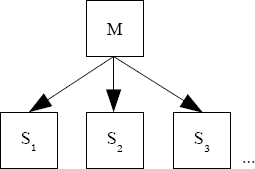
From time to time some customers are asking for the other way: Many masters replicating to one slave (which is also called multi-source replication). For this requirement MySQL replication cannot help you directly.
Possibilities
You can circumvent this situation in the following ways:
- Implement your own data transfer mechanism.
- Use this ugly hack I have written down 2 years ago: Multi-Master-Single-Slave-Replication
- Test the approach described in the following article.
- Wait until MySQL has implemented it…
Possibility number 4 for would be the nicest one. Because then the solution would be properly supported by your database vendor and you do not have …
Taxonomy upgrade extras: multi-master, slave, replication, multi-source,
Categories:
MySQL Multi-Master – Single-Slave – Replication (Episode 2)
[http://www.blogger.com/profile/01621441847303652718 Baron] said…
You can also use [http://code.google.com/p/mysql-mmre/ MySQL mmre]
Taxonomy upgrade extras:
Categories:
Test application for MySQL high availability (HA) set-up
When I set-up a MySQL HA environment for customers I usually do some final failover tests after configuring the whole beast.
To check if the application behaves like expected I always run my little test application (test.sh) from the server(s) where the customers application runs. It displays “graphically” how the application behaves and you can show to the customer immediately what is going on…
Make sure, that you point it to the virtual IP (VIP) or the load balancer (LB).
It was really useful for me and I recommend you to do your HA failover tests also at least with this little tool to avoid evil surprises in the future.
Taxonomy upgrade extras: english, high availability, test, mysql, application, ha,
Categories:
Citation of the week
Das dreieckige Rad hat gegenüber dem viereckigen einen gewaltigen Vorteil: Ein Rumms weniger pro Umdrehung!
Translation:
The triangular wheel has one enormous advantage over the quadrangular: One knock less per revolution!
Maybe not new, but I have not heard it yet and I love it. It was about reinventing functionality in a well known product…
Taxonomy upgrade extras: english, mysql, citation, week,
Categories:
Typical automated MySQL maintenance jobs
[http://www.blogger.com/profile/11195863756524022642 Shinguz] said…
Hi knetknight
Thanks for your comment.
When your are facing time/scheduling issues I recommend you to go through the MySQL online documentation (Chapter: Table Maintenance Statements and Restrictions on InnoDB Tables) because some of these commands have no effect on some table types (InnoDB) and some of them do the work already done in a previous command.
Regards Oli
Taxonomy upgrade extras:
Categories:
MySQL Cluster: No more room in index file
[http://www.blogger.com/profile/11195863756524022642 Shinguz] said… Hi Matthew
Thanks for your comment. This could have helped a lot. I do NOT ask why there was no message like:
Query OK, 1 row affected, 1 warning (0.10 sec)
or why the real cause was not displayed at all…
Taxonomy upgrade extras:
Categories:
MySQL Cluster: No more room in index file
[http://www.blogger.com/profile/04421029174237420523 Matthew Montgomery] said…
In this example I lowered the MaxNoOfOrderedIndexes to 25 and created a bunch of tables, then I got.
mysql> create table foo23 like foo1; ERROR 1005 (HY000): Can’t create table ‘./test/foo23’ (errno: 904) mysql> show warnings; +——-+——+———————————————————————————–+ | Level | Code | Message | +——-+——+———————————————————————————–+ | Error | 1296 | Got error 904 ‘Out of fragment records (increase MaxNoOfOrderedIndexes)’ from NDB | | Error | …
Taxonomy upgrade extras:
Categories:
MySQL Cluster: No more room in index file
[http://www.blogger.com/profile/04421029174237420523 Matthew Montgomery] said…
After any error in mysqld dealing with NDB tables you should always run “SHOW WARNINGS”. MySQL will only show the last error, which is the mysqld error, “no more room in index file” at execution time. This means that the NDB error which bubbled up to mysqld won’t be displayed unless you use the “SHOW WARNINGS” command.
Taxonomy upgrade extras:
Categories:
MySQL Cluster: No more room in index file
Recently we were migrating an InnoDB/MyISAM schema to NDB. I was too lazy to calculate all the needed MySQL Cluster parameters (for example with ndb_size.pl) and just took my default config.ini template.
Because I am really lazy I have a little script doing this for me (alter_engine.pl).
But suddenly my euphoria was stopped abruptly by the following error:
MySQL error code 136: No more room in index file
The usual command that helps me in such a situation is a follows:
# perror 136
MySQL error code 136: No more room in index file
But in this case it is not really helpful. Also
# perror --ndb 136
does not bring us further. Strange: Index file… We are converting from MyISAM/InnoDB to NDB. Why the hell is he using an index file for this operation? It seems to be clearly a mysqld error message and not a MySQL Cluster error message. And we are also not using MySQL Cluster disk data tables.
After bothering a bit MySQL support I had the idea to do the following:
# ndb_show_tables | grep -ic orderedindex …Taxonomy upgrade extras: english, mysql cluster, index file,
Categories:
Possible memory leak in NDB-API applications?
A customer has recently experienced a possible memory leak in its NDB-API application. What he did was something like:
# ps aux | grep <pid>
over time and then he saw the RSS increasing. When he would have had a look a little longer he would have seen that the RSS consumption would increase up to a certain level and then becomes stable. Which is the expected behavior.
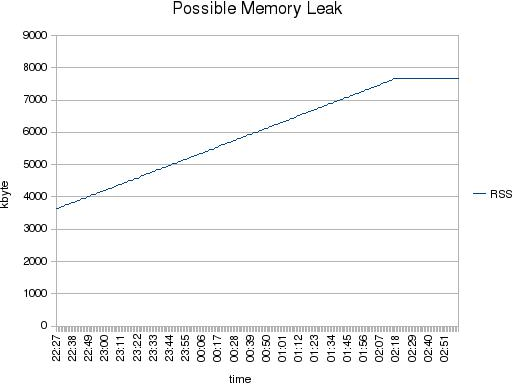
But how to explain to the customer that his application, which was in fact not doing anything, consumes more RSS?
With a diff over time on /proc/<pid>/smaps we found that this area was the reason:
b67b7000-b6fca000 rw-p b67b7000 00:00 0 (8 Mbyte)
Size:               8268 kB
Rss:                 148 kB
Shared_Clean:          0 kB
Shared_Dirty:          0 kB
Private_Clean:         0 kB
Private_Dirty:       148 kB
Referenced:          148 kB
But what is this meaning? To find the answer we did a strace on the program and got the following system calls:
...
read(5, "127.0.0.1 localhost<br>n<br>n# The follo"..., …
Taxonomy upgrade extras: english, memory leak, ndb-api, memory,
Categories:
Active/active failover cluster with MySQL Replication
[http://www.blogger.com/profile/13990877688502800403 Sheeri K. Cabral] said…
You could probably very easily put this all into a lua script, slap MySQL Proxy in front of it, and have automated failover – if it can’t reach the 1st backend, pick among the other backends by doing a query, promote it, etc.
Taxonomy upgrade extras:
Categories:
Active/active failover cluster with MySQL Replication
Electing a slave as new master and aligning the other slaves to the new master
In a simple MySQL Replication set-up you have high-availability (HA) on the read side (r). But for the master which covers all the writes (w) and the time critical read (rt) there is no HA implemented. For some situations this can be OK. For example if you have rarely writes or if you can wait until a new Master is set up.
But in other cases you need a fast failover to a new master.
In the following article it is shown how to implement the election of a new master and how to align the slaves to the new master.
We can have two possible scenarios:
- This scenario assumes, that every slave can become the new master.
- This scenario assumes, that only one dedicated slave will become master.
The advantages and disadvantages of both scenarios:
Scenario 1
+ You can choose the slave which is the most actual one.
- Higher possibility of errors if not automatized.
- You do not need an extra spare slave.
- More bin log writing on all Slaves. …
Taxonomy upgrade extras: english, high availability, mysql, replication, cluster, active-active, failover,
Categories:
Typical automated MySQL maintenance jobs
[http://www.blogger.com/profile/13385339200643211924 knetknight] said…
Just what I needed. I have become the maintainer of a small but previously neglected mysql server and was looking for exactly this kind of info. It serves one database which feeds an intranet application. The database/tables hadn’t had any maintenance in three years so I found some errors in it initially and am now in the process of automating basic maintenance.
I’ve currently got a nightly job which runs in this order:
flush query cache.
check table.
analyze table.
optimize table.
repair table.
Steps 2 - 5 are run against all the tables of the database that serves an intranet site. I’m fairly certain that check and analyze are not all that helpful in an AUTOMATED routine unless that routine has some logic to figure out what to do with the result codes. i.e. I may only need to run repair if check/analyze find errors but right now my automated process is running repair each night regardless.
Any thoughts?
Taxonomy upgrade extras:
Categories:
Typical automated MySQL maintenance jobs, query cache
The following maintenance jobs are typically run against a MySQL database:
- Backup
- Clean-up binary logs
- Optimize tables
- Purge query cache
- Rotate binary logs
Backup
A backup is not a typical maintenance job. But it behaves more or less like one. The backup should be done regularly depending on the restore/PITR (Point in Time Recovery) requirements.
Make sure, that in the backup all the necessary files (data files, transaction log files, configuration files and binary log files) are included. To prove that the backup process is working properly a regular restore should be performed. This can ideally be combined with the set-up of new database instances for developers or testing.
Clean-up the binary logs
The binary logs can be cleaned-up in two ways:
a
) Passive by MySQL itself:# my.cnf expire_logs_days = 7b
) Active by the customers environment:mysql> PURGE MASTER LOGS TO 'binarylog.000999'; mysql> PURGE MASTER LOGS BEFORE '2008-07-29 22:46:26';
Make sure NO binary logs are purged which …
Taxonomy upgrade extras: english, operations, mysql, mainenance jobs, query cache,
Categories:
Some more details about DiskSyncSize
Jon Stephens said…
According to the information I have, it was added in 5.1.12, not 5.1.23.
In any case, it is available in all recent MySQL Cluster NDB 6.2 and 6.3 releases.
Taxonomy upgrade extras:
Categories:
My thoughts about MySQL (Cluster) replication
According to Johans wishes I write down my concerns about MySQL (Cluster) replication. These items are things I run again and again into it with customers:
- SQL-nodes are still loosing too easy connection to cluster after data node or management node restart (which leads into gaps, see next point). Automatic failover or reconnection is just a dream (maybe it works in about 90% of the cases at least).
- Gaps: Whenever I do a cluster reconfiguration (should not be necessary too often, see loosing connection above) or a mysqld restart I get a gap (these are the planned ones, see also automatic channel failover). Then we have the not planned ones…
I cannot understand, why we are not able to keep at least a certain amount of traffic in a binlog-injector-buffer to avoid the majority of these gaps. This could be something like a Round-Robin buffer which stores all the cluster information which should be sent to the binlog-injector thread. When we configure this buffer to 1 Gbyte we can keep close to 2 minutes …
Taxonomy upgrade extras: english, mysql, replication, mysql cluster,
Categories:
Some more details about DiskSyncSize
Johan Andersson said…
I guess it is related to DiskCheckpointSpeed nowadays (>= 5.1 ).
johan (johanandersson.blogspot.com)
Taxonomy upgrade extras:
Categories:
Some more details about DiskSyncSize
The parameter DiskSyncSize is a MySQL Cluster parameter and was added in MySQL 5.1.23.
After the amount of stored bytes of data per file, the data node will fsync (flush) the LCP file to disk, even if a fsync is not needed for consistency.
This is done because the OS will otherwise buffer all the writes, and when a fsync is really needed, it can take a lot of time…
Originally this parameter was hard coded. Now it defaults to 4 Mbyte.
The parameter DiskSyncSize is related to the parameters NoOfDiskPagesToDiskAfterRestartTUP and NoOfDiskPagesToDiskAfterRestartACC which are deprecated right now. It does NOT replace the parameter TimeBetweenLocalCheckpoint.
This parameter should not be changed on any OS (with reasonable settings). With ODIRECT it is not used at all.
Thanks to Jonas for the help.
Taxonomy upgrade extras: english, mysql cluster, disksyncsize, parameter,
Categories:
With MySQL-Enterprise Montior through firewalls
Sometimes it is nice to show customers the functionality of MySQL-Enterprise Monitor (aka Merlin). I install the agents on the servers and the dashboard runs on my laptop. But very often only ssh is open to these servers.
So how to dig a whole through the firewall for MySQL-Enterprise Monitor?
# ssh -R 18080:localhost:18080 oli@where_the_agent_sits
Maybe trivial for you but for me its hard to remember…
Taxonomy upgrade extras: english, mysql, enterprise monitor, firewall,
Categories:
Sparse files
What is a sparse file?
“A sparse file is a file where space has been allocated but not actually filled with data. These space is not written to the file system. Instead, brief information about these empty regions is stored, which takes up much less disk space. These regions are only written to disk at their actual size when data is written to them. The file system transparently converts reads from empty sections into blocks filled with zero bytes at runtime.”
[ 1
]
In other words: Files are not as big as expected.
With databases this can be seen often: For example the MySQL Cluster REDO log files are created as sparse files or some ORACLE tablespace files.
But first let us create such a sparse file:
# dd if=/dev/zero of=sparsefile count=0 obs=1 seek=100G

# ls -lah sparsefile
-rw-r--r-- 1 oli users 100G 2007-10-24 11:18 sparsefile

# df -h .
Filesystem            Size  Used Avail Use% Mounted on
/dev/sda9             5.0G  3.5G  1.2G  75% /home
Funny: How can I have a 100 Gbyte file on a 5 Gbyte …
Taxonomy upgrade extras: english, sparse files,
Categories:
Pages

