


Feed Aggregator
Ranking in MySQL results
A friend of me asked me long time ago: “How can I have a ranking on a result with MySQL?”. Now I found some time to write it down:
Lets do first some preparation for the example:
CREATE TABLE sales (
  id     INT UNSIGNED NOT NULL AUTO_INCREMENT PRIMARY KEY
, fruit  VARCHAR(32)
, amount DECIMAL
);

INSERT INTO sales
VALUES (NULL, 'apple', 12.75), (NULL, 'orange', 1.89), (NULL, 'pear', 19.23)
     , (NULL, 'banana', 4.25), (NULL, 'cherry', 123.75), (NULL, 'plum', 23.15)
;
Now lets query:
SELECT fruit, amount
  FROM sales
 ORDER BY amount DESC
;

+--------+--------+
| fruit  | amount |
+--------+--------+
| cherry |    124 |
| plum   |     23 |
| pear   |     19 |
| apple  |     13 |
| banana |      4 |
| orange |      2 |
+--------+--------+
Hmmmm…., this not yet what we want!
And now with ranking:
SET @rank=0;

SELECT @rank:=@rank+1 AS rank, fruit, amount
  FROM sales
 ORDER BY amount DESC
;

+------+--------+--------+
| rank | fruit  | amount |
+------+--------+--------+
|    1 | cherry …
Taxonomy upgrade extras: mysql, ranking, result,
Categories:
MySQL logon trigger
With MySQL 5.0 the database provides trigger functionality on INSERT, REPLACE, UPDATE and DELETE.
Those of you who know some other RDBMS know, that there are also some system events where one would like to have triggers.
Unfortunately MySQL does not (yet) provide such functionality. This is sad because as database administrator this would be sometimes very helpful.
But you can build your own LOGON and STARTUP trigger.
MySQL provides some hooks for these events…
Complete Story (PDF 160 kbyte).
Taxonomy upgrade extras: english, mysql, logon trigger, trigger, login trigger, audit,
Categories:
MySQL Cluster restore
Recently the question came up if it is faster to restore a MySQL cluster when all nodes are up or only ONE node from each node group during restore.
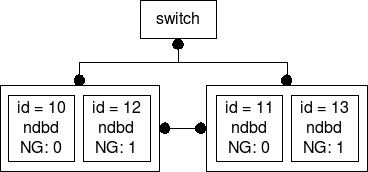
The answer from our gurus was: All nodes up during restore! I wanted to find out why. So I set up the following cluster and started to measure:
MySQL Cluster set up
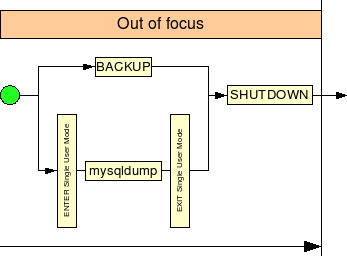
MySQL Cluster backup
The backup is not that interesting. But I made the drawing for possible future use :-) :
MySQL Cluster restore
For the restore there are 4 different ways thinkable:
- Restore with all nodes up and all 4 backup pieces are restored in sequence. (1a)
- Restore with all nodes up and all 4 backup pieces are restored in parallel. (1b)
- Restore with 1 node of each node group down and all 4 backup pieces are restored in sequence. (2a)
- Restore with 1 node of each node group down and all 4 backup pieces are restored in parallel. (2b)
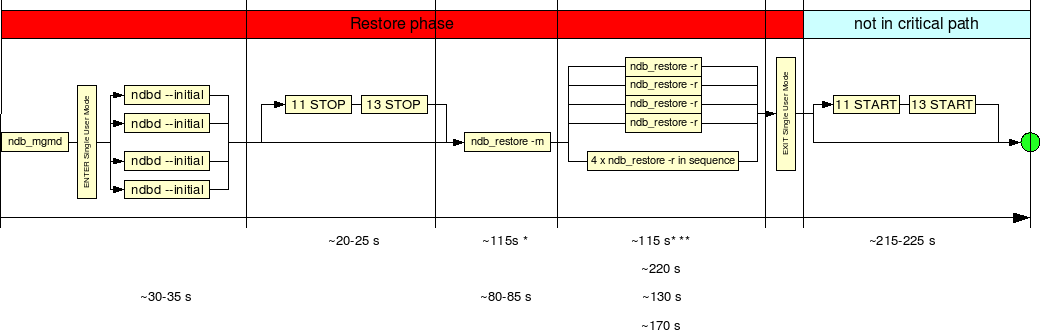
And we got the following times:
| Way | Initial | Stop | Meta | Data | Exit | Total | Start |
|---|---|---|---|---|---|---|---|
| 1a | ~ 30 - 35 s | n.a. | ~ 80 - 85 s | ~ 170 s | < 1 s | ~ 280 - 290 s | n.a. |
| 1b | ~ … |
Taxonomy upgrade extras: english, backup, restore, recovery, mysql, cluster,
Categories:
MyEnv (MySQL and MariaDB BasEnv)
What is MyEnv?
FromDual MyEnv is a database environment to run and operate several different MariaDB, MySQL or PostgreSQL database instances simultaneously on the SAME machine. You can even run multiple database instances with different binary versions. We call this multi-instance set-ups.
With MyEnv a multi-instance set-up is more comfortable to handle than with mysqld_multi (old) or Systemd services (new) and it provides more useful functionality.
Using MyEnv does not need the use of the O/S root user to operate MariaDB, MySQL or PostgreSQL database instances. Thus it is appropriate for classical enterprise DBA organizations (segregation of duties).
Further MyEnv multi-instance set-ups are a much more efficient way of consolidating MariaDB, MySQL and PostgreSQL database instances an has less overhead than virtualization or even container solutions. To do proper resource fencing MyEnv provides cgroup integration.
When to use MyEnv?
MyEnv is useful when you have to install several MariaDB, MySQL or PostgreSQL …
Taxonomy upgrade extras: environment, virtualization, consolidation, multi instance, saas, myenv, license, container, docker, incus, lxd, lxc, installation, operations,
MySQL Active - Active Clustering
It is possible to use an active - active shared-disk cluster in MySQL in some cases. For doing this you have to fulfill the following requirements:
- Works with MyISAM tables only.
- POSIX-locking compliant cluster file system on the device (such as OCFS2 or GFS).
- External locking must be enabled.
- The MySQL query cache must be turned off.
- The MySQL delay key write must be turned off.
- OS where file locking is supported in MySQL.
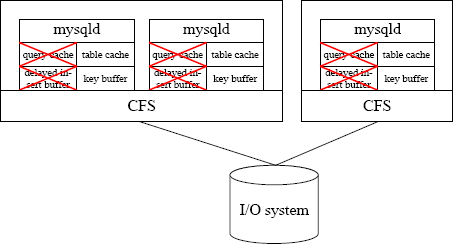
Interested? To read more, follow the link: MySQL active - active Cluster (PDF 157 kbyte).
Related pages
- A very interesting comment from Peter Zaitsev you MUST read. He comments, why this set up you should NOT use: MySQL MyISAM Active Active Clustering - looking for trouble?
And I do fully agree with him, that in 99% of all use cases this set up is not the right choice (and do not believe yours is the 1% :-))! - The MySQL architecture stack
Taxonomy upgrade extras: english, mysql, performance, active-active clustering, cluster,
Categories:
Transaction performance
Transaction performance relates among other things from I/O performance. This means hard disk performance.
Hard disk performance
When you select a hard disk, an important feature to consider is the performance (speed) of the drive. Hard disks come in a wide range of performance capabilities. As is true of many things, one of the best indicators of a drive’s relative performance is its price. An old saying from the automobile-racing industry is appropriate here: “Speed costs money. How fast do you want to go?”
The performance of a hard disk depends on several delays associated with reading or writing data on a computer’s disk drive.
A measurement, called average access time (AAT), involves the elements, average seek time (AST), average rotational latency (ARL) and transfer time (TT).
Interested? To read more, follow the link: Transaction Performance (PDF 92 kbyte).
Taxonomy upgrade extras: english, performance tuning, performance, transaction,
Categories:
Round-Robin Database Storage Engine (RRD)
In a round-robin database (RRD) usually time-series data like network bandwidth, temperatures, CPU load etc. is stored. The data is stored in the way that system storage footprint remains constant over time. This avoids resource expensive purge jobs and reduces complexity.

MySQL does NOT yet provide this kind of storage engine. Although some people were thinking about and some prototypes exists.
Nevertheless in this paper it is shown how you can build your own RRD tables: Round-Robin Database Storage Engine (RRD) (PDF 242 kbyte).
Taxonomy upgrade extras: english, mysql, storage engine, rrd, round-robin database,
Categories:
SATA Flash Solid State Disk up to 160 Gbyte announced!
The price for a 160 Gbyte disk will be around USD 15'000. This is still a bit expensive. But the access time is around 0.5 ms (both for reading and writing) which is around 10 times faster than a normal 15'000 rpm SCSI disk! The disk has NO cache because it is a cache itself (according to the supplier. Maybe this will change in the future). And the lifetime of a cell is > 5 mio writes. For the same performance one needs usually an array of around 10 disks. If your database is heavily write-I/O bound you should consider this solution.
I/O-Systems
Will NAND Flash / Solid State Disk (SSD) will be the future for Database I/O systems?
Actually SSD are still limited in size (64 GB) and expensive (EUR 30/GB) and thus cannot yet compete with SCSI or IDE disks. But they also have an advantage. They are fast!
For some uses like databases the price per GB is not that relevant. Also most of the databases fit into one or two 64 GB disks (more than 90%).
When you really get an I/O bottleneck you should consider to …
Taxonomy upgrade extras: english, performance, sata, flash, solid state disk,
Categories:
MySQL Multi-Master - Single-Slave - Replication
MySQL provides its replication for High Availability (HA) and for read Scale-out. Generally it is known that in a MySQL replication you can only replicate from one Master to many slaves. In this paper it is shown how a set-up can look like to replicate from two masters to one slave.
Caution: Handle this information with care!!!
Taxonomy upgrade extras: multi-master, slave, replication, multi-source,
Categories:
Profiling MySQL with oprofile
Probably the answer to this question is already known. But we want to prove it and by the way learn to deal with MySQL and oprofile.
Taxonomy upgrade extras: english, mysql, profiling, oprofile,
Categories:
Materialized Views (MV) with MySQL
Materialised View (MV) is the pre-calculated (materialised) result of a query. Unlike a simple VIEW the result of a Materialised View is stored somewhere, generally in a table. Materialised Views are used when immediate response is needed and the query where the Materialised View bases on would take to long to produce a result. Materialised Views have to be refreshed once in a while. It depends on the requirements how often a Materialised View is refreshed and how actual its content is. Basically a Materialised View can be refreshed immediately or deferred, it can be refreshed fully or to a certain point in time. MySQL does not provide Materialised Views by itself. But it is easy to build Materialised Views yourself.
Taxonomy upgrade extras: mysql, view, performance, materialized views, materialised views,
Categories:
Pittfalls with Federated Tables
A Federated Table is a table which points to a table in an other MySQL database instance (mostly on an other server). It can be seen as a view to this remote database table. Other RDBMS have similar concepts for example database links.
Read more about the pittfalls with MySQL Federated Tables…
Taxonomy upgrade extras: english, pittfalls, federated tables, federated storage engine,
Categories:
Some more MySQL tools added
We have added some more tools to our MySQL consulting tools collection.
Taxonomy upgrade extras: mysql, tool, consulting, tools, mysql-consulting,
Categories:
Some more benchmarks added
We have added some more database benchmarks to our collection.
More details you can find on our Benchmarking page.
Taxonomy upgrade extras: english, mysql, benchmark, tool,
Categories:
MySQL storage engines
One of the big advantages of MySQL is its concept of pluggable Storage Engines (SE). This means you can choose the most optimal storage engine for your needs. This also has a disadvantage: You have to know what you are doing…
More details you can find here: MySQL pluggable Storage Engines (SE).
Taxonomy upgrade extras: english, mysql, storage engine,
Categories:
Full-Text Search Engines
MySQL has also a Full-Text Search Engine built in. But this Search Engine is not as fast a you probably want to. Thus there are some alternative Full-Text Search Engines which might be working together with MySQL.
- MySQL/MyISAM Full-Text Search
- Sphinx Search
- Lucene
- MnogoSearch
- Solr (based on Lucene)
- Omikron Fact-Finder
- Ioda
- Kneobase (based on Lucene)
- Egothor
- Xapian
More information
Who uses what Full-Text Search Engine
- 2010-10-06: Twitter goes to Lucene
- Wikimedia uses Lucene
Taxonomy upgrade extras: english, full-text, search, engine, sphinx, lucene,
Categories:
Stealthy migrating MySQL tables and MySQL data access interfaces using enlarged updateable VIEW functionality
Applications occasionally require redesign. However, redesigning an application cannot be done in one step because the application is distributed or several versions of applications must be supported. MySQL 5.0 provides the necessary means to stealthy migrate your data. In a short overview let’s look at what we plan to do: Stealthy Migration (PDF 98.7 kByte).
Taxonomy upgrade extras: english, mysql, migration, table, data, access, interface, view,
Categories:
Pages

