


Making HAProxy High Available for MySQL Galera Cluster
Sun, 2014-12-14 18:37 —
Shinguz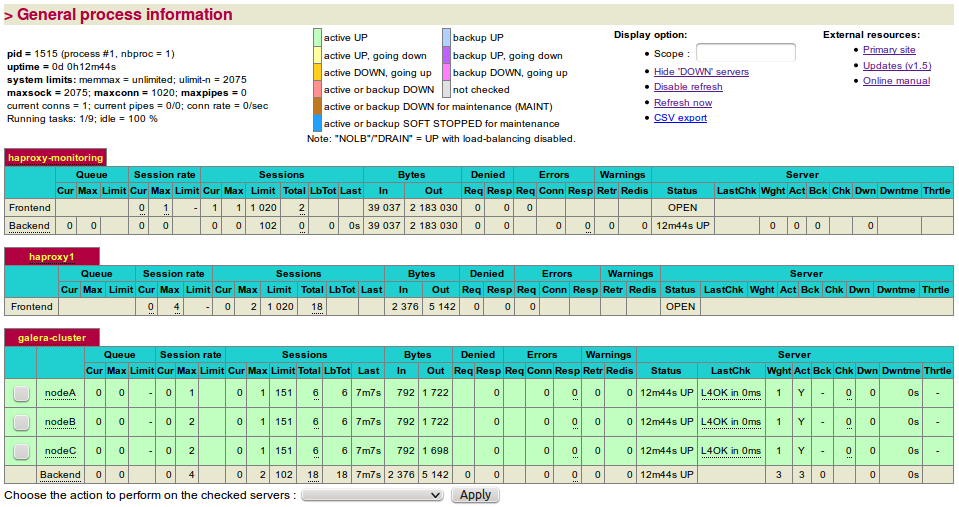
After properly installing and testing a Galera Cluster we see that the set-up is not finished yet. It needs something in front of the Galera Cluster that balances the load over all nodes.
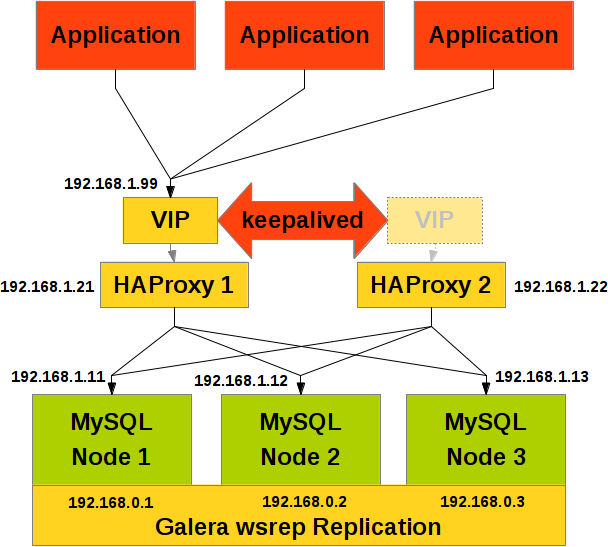
So we install a load balancer in front of the Galera Cluster. Typically nowadays HAProxy is chosen for this purpose. But then we find, that the whole Galera Cluster is still not high available in case the load balancer fails or dies. So we need a second load balancer for high availability.
But how should we properly failover when the HAProxy load balancer dies? For this purpose we put a Virtual IP (VIP) in front of the HAProxy load balancer pair. The Virtual IP is controlled and failovered with Keepalived.
Installation of HAProxy and Keepalived
First some preparations: For installing socat we need the repoforge repository:
shell> cd /download
shell> wget http://pkgs.repoforge.org/rpmforge-release/rpmforge-release-0.5.3-1.el6.rf.x86_64.rpm
shell> yum localinstall rpmforge-release-0.5.3-1.el6.rf.x86_64.rpm
shell> yum update
shell> yum install socat
Then we can start installing HAProxy and Keepalived:
shell> yum install haproxy keepalived

shell> chkconfig haproxy on
shell> chkconfig keepalived on
We can check the installed HAProxy and Keepalived versions as follows:
shell> haproxy -v
HA-Proxy version 1.5.2 2014/07/12

shell> keepalived --version
Keepalived v1.2.13 (10/15,2014)
Configuration of HAProxy
More details you can find in the HAProxy documentation.
shell> cp /etc/haproxy/haproxy.cfg /etc/haproxy/haproxy.cfg.bak
# This HAProxy configuration was tested with version 2.6.12
shell> cat << _EOF >/etc/haproxy/haproxy.cfg
#
# /etc/haproxy/haproxy.cfg
#

#---------------------------------------------------------------------
# Global settings
#---------------------------------------------------------------------
global
  # to have these messages end up in /var/log/haproxy.log you will
  # need to:
  #
  # 1) configure syslog to accept network log events.  This is done
  #    by adding the '-r' option to the SYSLOGD_OPTIONS in
  #    /etc/sysconfig/syslog
  #
  # 2) configure local2 events to go to the /var/log/haproxy.log
  #   file. A line like the following can be added to
  #   /etc/sysconfig/syslog
  #
  #    local2.*                       /var/log/haproxy.log
  #
  log         127.0.0.1 local2

  chroot      /var/lib/haproxy
  maxconn     1020   # See also: ulimit -n
  user        haproxy
  group       haproxy
  daemon

  # turn on stats unix socket
  stats socket /var/lib/haproxy/stats.sock mode 600 level admin
  stats timeout 2m

#---------------------------------------------------------------------
# common defaults that all the 'frontend' and 'backend' sections will
# use if not designated in their block
#---------------------------------------------------------------------
defaults
  mode    tcp
  log     global
  option  dontlognull
  option  redispatch
  retries                   3
  timeout queue             45s
  timeout connect           5s
  timeout client            1m
  timeout server            1m
  timeout check             10s
  maxconn                   1020

#---------------------------------------------------------------------
# HAProxy statistics backend
#---------------------------------------------------------------------
listen haproxy-monitoring
  bind    *:80
  mode    http
  stats   enable
  stats   show-legends
  stats   refresh           5s
  stats   uri               /
  stats   realm             Haproxy<br> Statistics
  stats   auth              monitor:AdMiN123
  stats   admin             if TRUE

frontend haproxy1   # change on 2nd HAProxy
  bind    *:3306
  default_backend           galera-cluster

backend galera-cluster
  balance roundrobin
  server  nodeA             192.168.1.61:3306 maxconn 151 check
  server  nodeB             192.168.1.62:3306 maxconn 151 check
  server  nodeC             192.168.1.63:3306 maxconn 151 check
_EOF
Starting and testing HAProxy
The HAProxy can be started as follows:
shell> service haproxy start
and then be checked either over the socket:
shell> socat /var/lib/haproxy/stats.sock readline
  prompt
  > show info
  > show stat
  > help
or over your favourite web browser entering the username and password (monitor:AdMiN123) specified in the configuration file above:
To check the application over the load balancer we can run the following command:
shell> mysql --user=app --password=secret --host=192.168.1.38 --port=3306 --exec="SELECT @@wsrep_node_name;"
+-------------------+
| @@wsrep_node_name |
+-------------------+
| Node C            |
+-------------------+
shell>  mysql --user=app --password=secret --host=192.168.1.38 --port=3306 --exec="SELECT @@wsrep_node_name;"
+-------------------+
| @@wsrep_node_name |
+-------------------+
| Node A            |
+-------------------+
shell>  mysql --user=app --password=secret --host=192.168.1.38 --port=3306 --exec="SELECT @@wsrep_node_name;"
+-------------------+
| @@wsrep_node_name |
+-------------------+
| Node B            |
+-------------------+
Configuration a Virtual IP (VIP) with Keepalived
Now we have 2 HAProxy load balancers. But what happens if one of them fails. Then we do not want to reconfigure our application to work properly again. The failover should happen automatically. For this we need a Virtual IP which should automatically failover.
More details you can find in the Keepalived documentation and the keepalived user guide.
shell> cp /etc/keepalived/keepalived.conf /etc/keepalived/keepalived.conf.bak
cat << _EOF >/etc/keepalived/keepalived.conf
#
# /etc/keepalived/keepalived.conf
#

global_defs {

  notification_email {
    remote-dba@fromdual.com
    root@localhost
  }

  # Change email from on lb2:
  notification_email_from lb1@haproxy1
  router_id HAPROXY
}

vrrp_script chk_haproxy {
  script   "killall -0 haproxy"
  interval 2
  weight   2
}

vrrp_instance GALERA_VIP {

  interface         eth1
  virtual_router_id 42
  # Higher priority on other node
  priority          101   # 102
  advert_int        1
  # notify "/usr/local/bin/VRRP-notification.sh"

  virtual_ipaddress {
    192.168.1.99/32 dev eth1
  }

  track_script {
    chk_haproxy
  }

  authentication {
    auth_type PASS
    auth_pass secret
  }
}
_EOF
Starting and testing Keepalived
To test the keepalived we can run the following command:
shell> keepalived -f /etc/keepalived/keepalived.conf --dont-fork --log-console --log-detail
^C
To finally start it the following command will serve:
shell> service keepalived start
To check the Virtual IP the following command will help:
shell> ip addr show eth1
And then we can check our application over the VIP:
shell> mysql --user=app --password=secret --host=192.168.1.99 --port=3306 --exec="SELECT @@wsrep_node_name;"
Literature
- Brian Seitzer: Redundant Load Balancers – HAProxy and Keepalived
