


MaxScale configuration synchronisation
Thu, 2024-04-04 09:53 —
Shinguz
Table of contents
- Overview
- Preparations
- Activate MaxScale configuration synchronisation
- Change MaxScale parameters
- Add new slave and make MaxScale known
- Remove old slave and make MaxScale known
- How is the configuration synchronised?
- What happens in the event of a conflict?
- Tests
- Deactivating MaxScale configuration synchronisation again
- Literature/sources
Overview
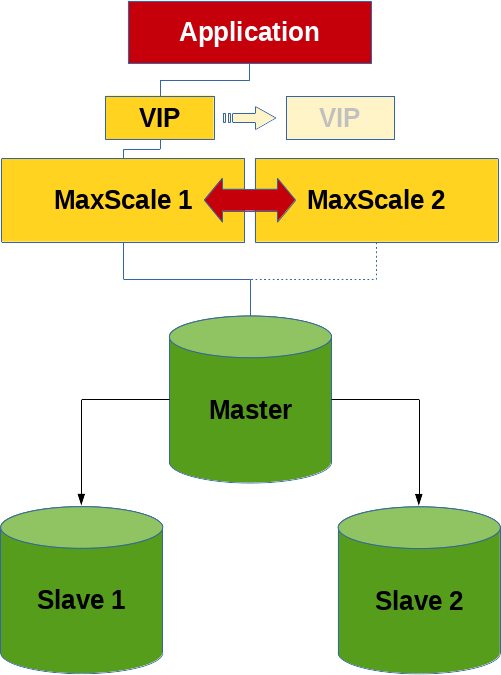
A feature that I recently discovered while browsing is the MaxScale configuration synchronisation functionality.
This is not primarily about a MariaDB replication cluster or a MariaDB Galera cluster, but about a cluster consisting of two or more MaxScale nodes. Or more precisely, the exchange of the configuration between these MaxScale nodes.
Pon Suresh Pandian has already written a blog article about this feature in 2022, which is even more detailed than this post here.
Preparations
An Incus container environment was prepared, consisting of 3 database containers (deb12-n1 (10.139.158.33), deb12-n2 (10.139.158.178), deb12-n3 (10.139.158.39)) and 2 MaxScale containers (deb12-mxs1 (10.139.158.66), deb12-mxs2 (10.139.158.174)). The database version is a MariaDB 10.11.6 from the Debian repository and MaxScale was downloaded in version 22.08.5 from the MariaDB plc website.
The database configuration looks similar for all 3 nodes:
#
# /etc/mysql/mariadb.conf.d/99-fromdual.cnf
#

[server]

server_id               = 1
log_bin                 = deb12-n1-binlog
binlog_format           = row
bind_address            = *
proxy_protocol_networks = ::1, 10.139.158.0/24, localhost
gtid_strict_mode        = on
log_slave_updates       = on
skip_name_resolve       = on
The MaxScale nodes were built as described in the article Sharding with MariaDB MaxScale.
The maxscale_admin user has exactly the same rights as described there, the maxscale_monitor user has the following rights:
RELOAD, SUPER, REPLICATION SLAVE, READ_ONLY ADMIN
See also here: Required Grants.
The MaxScale start configuration looks like this:
#
# /etc/maxscale.cnf
#

[maxscale]
threads                      = auto
admin_gui                    = false

[deb12-n1]
type                         = server
address                      = 10.139.158.33
port                         = 3306
proxy_protocol               = true

[deb12-n2]
type                         = server
address                      = 10.139.158.178
port                         = 3306
proxy_protocol               = true

[Replication-Monitor]
type                         = monitor
module                       = mariadbmon
servers                      = deb12-n1,deb12-n2
user                         = maxscale_monitor
password                     = secret
monitor_interval             = 500ms
auto_failover                = true
auto_rejoin                  = true
enforce_read_only_slaves     = true
replication_user             = replication
replication_password         = secret
cooperative_monitoring_locks = majority_of_running

[WriteListener]
type                         = listener
service                      = WriteService
port                         = 3306

[WriteService]
type                         = service
router                       = readwritesplit
servers                      = deb12-n1,deb12-n2
user                         = maxscale_admin
password                     = secret
transaction_replay           = true
transaction_replay_timeout   = 30s
Important: The configuration should look the same on all MaxScale nodes!
And then a few more checks were done to be sure that everything is correct:
shell> maxctrl list listeners
┌───────────────┬──────┬──────┬─────────┬──────────────┐
│ Name          │ Port │ Host │ State   │ Service      │
├───────────────┼──────┼──────┼─────────┼──────────────┤
│ WriteListener │ 3306 │ ::   │ Running │ WriteService │
└───────────────┴──────┴──────┴─────────┴──────────────┘

shell> maxctrl list services
┌──────────────┬────────────────┬─────────────┬───────────────────┬────────────────────┐
│ Service      │ Router         │ Connections │ Total Connections │ Targets            │
├──────────────┼────────────────┼─────────────┼───────────────────┼────────────────────┤
│ WriteService │ readwritesplit │ 0           │ 0                 │ deb12-n1, deb12-n2 │
└──────────────┴────────────────┴─────────────┴───────────────────┴────────────────────┘

shell> maxctrl list servers
┌──────────┬────────────────┬──────┬─────────────┬─────────────────┬────────┬─────────────────────┐
│ Server   │ Address        │ Port │ Connections │ State           │ GTID   │ Monitor             │
├──────────┼────────────────┼──────┼─────────────┼─────────────────┼────────┼─────────────────────┤
│ deb12-n1 │ 10.139.158.33  │ 3306 │ 0           │ Master, Running │ 0-1-19 │ Replication-Monitor │
├──────────┼────────────────┼──────┼─────────────┼─────────────────┼────────┼─────────────────────┤
│ deb12-n2 │ 10.139.158.178 │ 3306 │ 0           │ Slave, Running  │ 0-1-19 │ Replication-Monitor │
└──────────┴────────────────┴──────┴─────────────┴─────────────────┴────────┴─────────────────────┘

SQL> SELECT @@hostname, test.* FROM test.test;
+------------+----+-----------+---------------------+
| @@hostname | id | data      | ts                  |
+------------+----+-----------+---------------------+
| deb12-n2   |  1 | Some data | 2024-03-26 09:40:21 |
+------------+----+-----------+---------------------+

SQL> SELECT @@hostname, test.* FROM test.test FOR UPDATE;
+------------+----+-----------+---------------------+
| @@hostname | id | data      | ts                  |
+------------+----+-----------+---------------------+
| deb12-n1   |  1 | Some data | 2024-03-26 09:40:21 |
+------------+----+-----------+---------------------+
And another test whether MaxScale really executes the failover correctly:
shell> systemctl stop mariadb
2024-03-26 16:27:05   error  : Monitor was unable to connect to server deb12-n2[10.139.158.178:3306] : 'Can't connect to server on '10.139.158.178' (115)'
2024-03-26 16:27:05   notice : Server changed state: deb12-n2[10.139.158.178:3306]: master_down. [Master, Running]→[Down]
2024-03-26 16:27:05   warning: [mariadbmon] Primary has failed. If primary does not return in 4 monitor tick(s), failover begins.
2024-03-26 16:27:07   notice : [mariadbmon] Selecting a server to promote and replace 'deb12-n2'. Candidates are: 'deb12-n1'.
2024-03-26 16:27:07   notice : [mariadbmon] Selected 'deb12-n1'.
2024-03-26 16:27:07   notice : [mariadbmon] Performing automatic failover to replace failed primary 'deb12-n2'.
2024-03-26 16:27:07   notice : [mariadbmon] Failover 'deb12-n2'→'deb12-n1' performed.
2024-03-26 16:27:07   notice : Server changed state: deb12-n1[10.139.158.33:3306]: new_master. [Slave, Running]→[Master, Running]

shell> systemctl start mariadb
2024-03-26 16:28:03   notice : Server changed state: deb12-n2[10.139.158.178:3306]: server_up. [Down]→[Running]
2024-03-26 16:28:03   notice : [mariadbmon] Directing standalone server 'deb12-n2' to replicate from 'deb12-n1'.
2024-03-26 16:28:03   notice : [mariadbmon] Replica connection from deb12-n2 to [10.139.158.33]:3306 created and started.
2024-03-26 16:28:03   notice : [mariadbmon] 1 server(s) redirected or rejoined the cluster.
2024-03-26 16:28:03   notice : Server changed state: deb12-n2[10.139.158.178:3306]: new_slave. [Running]→[Slave, Running]
Which MaxScale node is currently responsible for monitoring and failover (cooperatve_monitoring) can be determined as follows:
shell> maxctrl show monitor Replication-Monitor | grep -e 'Diagnostics' -e '"primary"' -e 'lock_held' | uniq
│ Monitor Diagnostics │ {                                                                                                                                                                                                                      │
│                     │     "primary": true,                                                                                                                                                                                                   │
│                     │             "lock_held": true,                                                                                                                                                                                         │
It should be ensured that everything works properly up to this point. Otherwise there is no real point in the next steps.
Activate MaxScale configuration synchronisation
A separate database user with the following rights is required for configuration synchronisation:
SQL> CREATE USER 'maxscale_confsync'@'%' IDENTIFIED BY 'secret';
SQL> GRANT SELECT, INSERT, UPDATE, CREATE ON `mysql`.`maxscale_config` TO maxscale_confsync@'%';
MaxScale must then be configured accordingly (on both MaxScale nodes) so that configuration synchronisation is activated. This configuration takes place in the global MaxScale section:
#
# /etc/maxscale.cnf
#

[maxscale]
config_sync_cluster  = Replication-Monitor
config_sync_user     = maxscale_confsync
config_sync_password = secret
The MaxScale nodes are then restarted:
shell> systemctl restart maxscale
MaxScale configuration synchronisation can also be activated and deactivated dynamically:
shell> maxctrl show maxscale | grep config_sync
│              │     "config_sync_cluster": null,                                        │
│              │     "config_sync_db": "mysql",                                          │
│              │     "config_sync_interval": "5000ms",                                   │
│              │     "config_sync_password": null,                                       │
│              │     "config_sync_timeout": "10000ms",                                   │
│              │     "config_sync_user": null,                                           │
Here it is important to keep to the correct order of the 3 commands, otherwise there will be an error:
shell> MAXCTRL_WARNINGS=0 maxctrl alter maxscale config_sync_user='maxscale_confsync'
shell> MAXCTRL_WARNINGS=0 maxctrl alter maxscale config_sync_password='secret'
shell> MAXCTRL_WARNINGS=0 maxctrl alter maxscale config_sync_cluster='Replication-Monitor'
Change MaxScale parameters
As a first test, we have focussed on the MaxScale monitor variable monitor_interval, which in this case is even different on both MaxScale nodes:
shell>  maxctrl show monitor Replication-Monitor | grep monitor_interval
│                     │     "monitor_interval": "750ms",

shell> maxctrl show monitor Replication-Monitor | grep monitor_interval
│                     │     "monitor_interval": "1000ms",
The variable can now be set on a MaxScale node with the alter monitor command:
shell> MAXCTRL_WARNINGS=0 maxctrl alter monitor Replication-Monitor monitor_interval=500ms
OK
which can be seen in the MaxScale error log:
2024-03-26 14:09:16 notice : (ConfigManager); Updating to configuration version 1
On the other hand, the value should be propagated to the second MaxScale node within 5 seconds (config_sync_interval), which can be checked with the above command.
Add new slave and make MaxScale known
A new slave (deb12-n3) is first created and added to the MariaDB replication cluster by hand. The slave is then made known to a MaxScale node:
shell> maxctrl create server deb12-n3 10.139.158.39

shell> MAXCTRL_WARNINGS=0 maxctrl link monitor Replication-Monitor deb12-n3
OK

shell> MAXCTRL_WARNINGS=0 maxctrl link service WriteService deb12-n3
OK

shell> maxctrl list servers
┌──────────┬────────────────┬──────┬─────────────┬─────────────────┬────────────┬─────────────────────┐
│ Server   │ Address        │ Port │ Connections │ State           │ GTID       │ Monitor             │
├──────────┼────────────────┼──────┼─────────────┼─────────────────┼────────────┼─────────────────────┤
│ deb12-n1 │ 10.139.158.33  │ 3306 │ 3           │ Slave, Running  │ 0-2-479618 │ Replication-Monitor │
├──────────┼────────────────┼──────┼─────────────┼─────────────────┼────────────┼─────────────────────┤
│ deb12-n2 │ 10.139.158.178 │ 3306 │ 3           │ Master, Running │ 0-2-479618 │ Replication-Monitor │
├──────────┼────────────────┼──────┼─────────────┼─────────────────┼────────────┼─────────────────────┤
│ deb12-n3 │ 10.139.158.39  │ 3306 │ 1           │ Slave, Running  │ 0-2-479618 │ Replication-Monitor │
└──────────┴────────────────┴──────┴─────────────┴─────────────────┴────────────┴─────────────────────┘
Remove old slave and make MaxScale known
Before a slave can be deleted, it should be removed from the replication cluster for a MaxScale node:
shell> maxctrl destroy server deb12-n1 --force
OK

shell> maxctrl list servers
┌──────────┬────────────────┬──────┬─────────────┬─────────────────┬────────────┬─────────────────────┐
│ Server   │ Address        │ Port │ Connections │ State           │ GTID       │ Monitor             │
├──────────┼────────────────┼──────┼─────────────┼─────────────────┼────────────┼─────────────────────┤
│ deb12-n2 │ 10.139.158.178 │ 3306 │ 3           │ Master, Running │ 0-2-493034 │ Replication-Monitor │
├──────────┼────────────────┼──────┼─────────────┼─────────────────┼────────────┼─────────────────────┤
│ deb12-n3 │ 10.139.158.39  │ 3306 │ 1           │ Slave, Running  │ 0-2-493032 │ Replication-Monitor │
└──────────┴────────────────┴──────┴─────────────┴─────────────────┴────────────┴─────────────────────┘
The slave can then be removed.
How is the configuration synchronised?
The configuration of the two MaxScale nodes is synchronised via the database, which I personally consider to be an unfortunate design decision, as a configuration change could potentially cause chaos if the master breaks or network problems occur between the database nodes…
The configuration is stored in the table mysql.maxscale_config, which looks like this:
CREATE TABLE `maxscale_config` (
  `cluster` varchar(256) NOT NULL,
  `version` bigint(20) NOT NULL,
  `config` longtext CHARACTER SET utf8mb4 COLLATE utf8mb4_bin NOT NULL CHECK (json_valid(`config`)),
  `origin` varchar(254) NOT NULL,
  `nodes` longtext CHARACTER SET utf8mb4 COLLATE utf8mb4_bin NOT NULL CHECK (json_valid(`nodes`)),
  PRIMARY KEY (`cluster`)
) ENGINE=InnoDB DEFAULT CHARSET=utf8mb4 COLLATE=utf8mb4_general_ci
This table has approximately the following content:
SQL> SELECT cluster, version, CONCAT(SUBSTR(config, 1, 32), ' ... ', SUBSTR(config, -32)) AS config , origin, nodes FROM mysql.maxscale_config;
+---------------------+---------+-----------------------------------------------------------------------+------------+------------------------------------------+
| cluster             | version | config                                                                | origin     | nodes                                    |
+---------------------+---------+-----------------------------------------------------------------------+------------+------------------------------------------+
| Replication-Monitor |       2 | {"config":[{"id":"deb12-n1","typ ... ter_name":"Replication-Monitor"} | deb12-mxs1 | {"deb12-mxs1": "OK", "deb12-mxs2": "OK"} |
+---------------------+---------+-----------------------------------------------------------------------+------------+------------------------------------------+
A local copy is available on each node for security reasons:
shell> cut -b-32 /var/lib/maxscale/maxscale-config.json
{"config":[{"id":"deb12-n2","typ
What happens in the event of a conflict?
See also: Error Handling in Configuration Synchronization
If the configuration is changed simultaneously (within config_sync_interval?) on two different MaxScale nodes, we receive the following error message:
Error: Server at http://127.0.0.1:8989 responded with 400 Bad Request to `PATCH monitors/Replication-Monitor`
{
    "errors": [
        {
            "detail": "Cannot start configuration change: Configuration conflict detected: version stored in the cluster (3) is not the same as the local version (2), MaxScale is out of sync."
        }
    ]
}
The following command may help to recognise the problem in the event of major faults:
shell> maxctrl show maxscale | grep -A9 'Config Sync'
│ Config Sync  │ {                                                                       │
│              │     "checksum": "0052fe6f775168bf00778abbe37775f6f642adc7",             │
│              │     "nodes": {                                                          │
│              │         "deb12-mxs1": "OK",                                             │
│              │         "deb12-mxs2": "OK"                                              │
│              │     },                                                                  │
│              │     "origin": "deb12-mxs2",                                             │
│              │     "status": "OK",                                                     │
│              │     "version": 3                                                        │
│              │ }                                                                       │
Tests
All tests were also carried out under load. The following tests ran in parallel:
insert_test.phpinsert_test.shmixed_test.phpwhile [ true ] ; do mariadb -s --user=app --host=10.139.158.174 --port=3306 --password=secret --execute='SELECT @@hostname, COUNT(*) FROM test.test GROUP BY @@hostname' ; sleep 0.5 ; donewhile [ true ] ; do mariadb -s --user=app --host=10.139.158.174 --port=3306 --password=secret --execute='SELECT @@hostname, COUNT(*) FROM test.test GROUP BY @@hostname FOR UPDATE' ; sleep 0.5 ; done
All tests have run flawlessly and without problems with all manipulations.
Deactivate MaxScale configuration synchronisation again
Execute the following command on both MaxScale nodes to end configuration synchronisation:
shell> MAXCTRL_WARNINGS=0 maxctrl alter maxscale config_sync_cluster=''
Literature/sources
- MaxScale globale Konfigurationsvariable: config_sync_cluster
- MaxScale Configuration Synchronization
- Pon Suresh Pandian, MariaDB, 24. August 2022: MariaDB MaxScale 6.0 Native Clustering
- Where to get maxscale 6 mysql.maxscale_config table source sql
- Setting up MariaDB MaxScale
- Configuring the MariaDB Monitor
- MariaDB MaxScale Load Balancer with Master/Master Replication
- MariaDB Monitor - Configuration
